
OData
The Microsoft OData Connector lets you retrieve published and available Collection versions that are associated with OData. You can access and work with your data directly in any tool that is able to connect with OData Connector.
Set up OData
Use OData to analyze data, create reports, and manage your Data Hub datasets in your workflow.
The following directions explain how to use OData using Excel.
- Open Excel and go toData, then theGet Datatab.
- SelectFrom Other Sources, thenFrom OData Feed.
- Keep the defaultBasicoption selected in theOData Feedwindow, then enter your specific regional URL.For Original Records in a Collection:For Aggregated Records in a Collection:For detailed RollUp breakdown of the aggregated Records in a Collection:
- SelectOK.
- SelectBasic.
- For ONESOURCE portal single-client users:
- Enter your ONESOURCE sign in information.
- For ONESOURCE portal multi-client users:
- In theUsernamefield, enter your ONESOURCE username and Client ID in the format of<ONESOURCE Username>/<Client ID>.
- Enter your ONESOURCE password in thePasswordfield.
- For users who use Single Sign-On (SSO) and don't have ONESOURCE credentials:
- In theUsernamefield, either leave it blank or enter any value.
- Enter a bearer token in the format ofBearer <value of the token>.
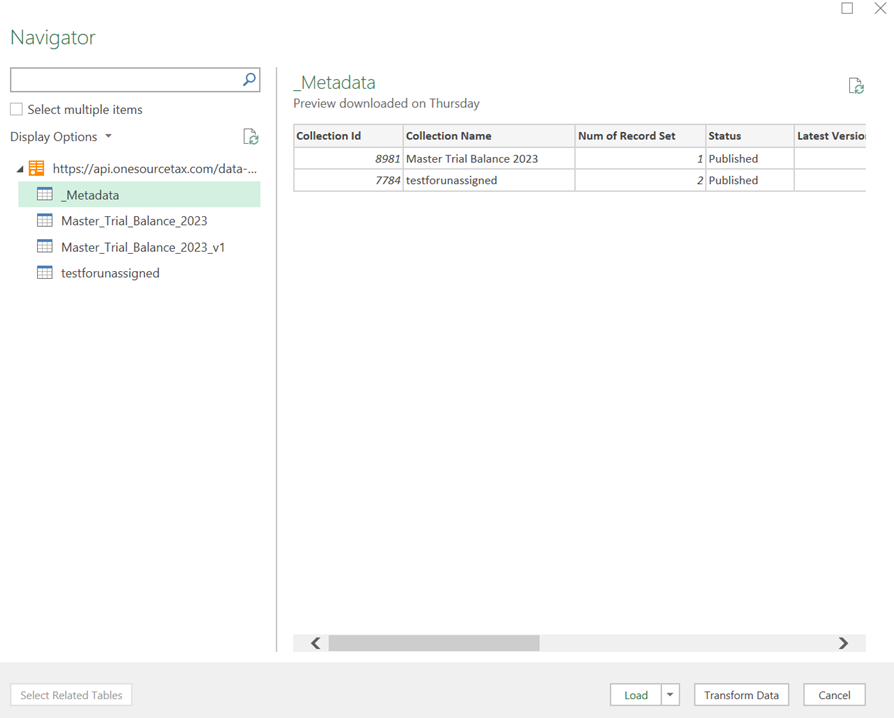
- SelectConnect.A list of Collection versions is listed on the left-hand side of your screen.
- You can select an item in the list to work with the data. Choose to preview the data, load it into Excel, or change it using Excel tools.
 note
note- The result list is sorted in alphabetical order.
- Metadata shows the latest published versions of available or hidden Collections associated with OData.
- Naming conventions:
- For the latest version: <Collection Name>
- For specific versions: <Collection Name>_v<Version Number>
- For specific aggregations and breakdowns: <Collection Name>_v<Version Number>_<Aggregation Name> or <Collection Name>_<Aggregation Name>
- Underscores replace spaces in Collection Names. This is only for the OData view. It doesn't affect anything in ONESOURCE Data Hub.
- When you select a Collection Version, you'll see the system field names as column names.
- You can see Collections only if you have specific permissions to the underlying Blueprints or if the Blueprints are public.
- Breakdowns appear only for Aggregations that are configured with RollUps.