
January - March 2026
Schematics
Blank value validation
You can now configure Schematics to accept or reject the blank values in a file.
Use the
Move Blank to Invalid
switch to turn on or off the validation. If the validation is turned on, the rows in the file containing blank values will move to Invalid
state during processing.The validation option is available on 2 screens:
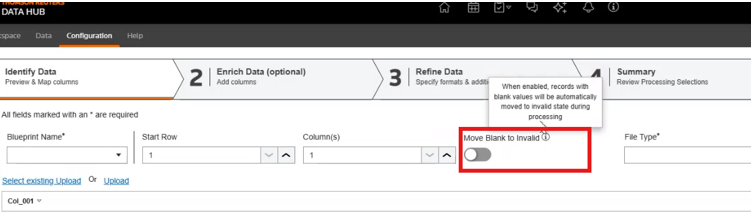
- Add Schematicscreen: On the 1st row of entry between theColumn(s)dropdown and theFile Typefield.
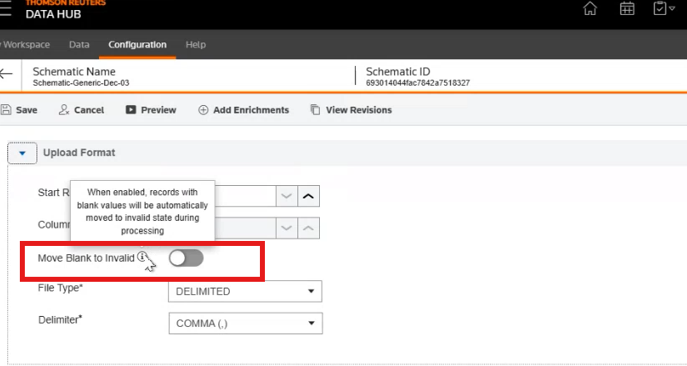
- Edit Schematicscreen: In theUpload Formatcollapsible section.
Refer to the Thomson Reuters API Reference for details.
Enrichment behaviour
When Source file has blank values:
- Parse
- Blank ValidationON: if resulting Enriched column has blank values, it will be moved toInvalid.
- Blank ValidationOFF: if resulting Enriched column has blank values, it will be moved toReady.
- Combine
- Blank ValidationON: if resulting Enriched column has blank values, it will be moved toInvalid.
- Blank ValidationOFF: if resulting Enriched column has blank values, it will be moved toReady.
- Add Single Value
- Blank ValidationON: if value provided is blank, it will be moved toInvalid.
- Blank ValidationOFF: if value provided is blank, it will be moved toReady.
- Look Up
- Blank ValidationON: if resulting Enriched column has blank values, it will be moved toInvalid.
- Blank ValidationOFF: if resulting Enriched column has blank values, it will be moved toReady.
- CalculationsBlank ValidationDropdown choiceResultONIgnore All BlanksEnrichment will be performed, and blank values, along with the calculations, will be moved to Invalid.OFFIgnore All BlanksEnrichment will be performed, and blank values will be ignored and moved to Ready.ONConsider All blanks as zeroBlanks considered as zero and moved to invalidOFFConsider All blanks as zeroBlanks considered as zero and moved to readyONConsider all blanks as blanksBlanks considered as invalidOFFConsider all blanks as blanksBlanks considered as invalid
Data - All uploads
JSON
Users can now submit JSON data directly via API without needing to convert to text files first, streamlining data ingestion workflows.
- Submit raw JSON payloads directly through API requests.
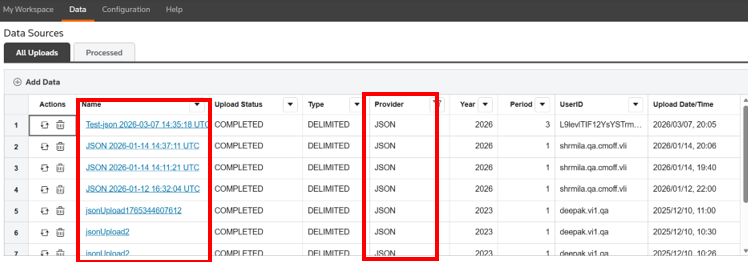
- System converts JSON to CSV format while processing and places inAll Uploads. Provider type is reflected asJSON.
- System appends the current date and timestamp to the provided file name.
Refer to the Thomson Reuters API Reference for details.
UTF-16
In addition to UTF-8, the import supports UTF-16 LE and BE encoded files for both txt and csv extensions. These files can be uploaded, previewed and processed to create Topics.
Refer to the Thomson Reuters API Reference for details.
My Workspace
Collection - Topic Creation Timestamp in Add Data to Collection Grid
You can view the exact date and time when a topic was added to a collection. The date and time will show in the
Created At
column of the grid.