
Use Authority Compiler
Authority Compiler compiles your document into a self-contained Word or PDF by appending cited Westlaw authorities and inserting hyperlinks that jump to the attached sources for easy filing and sharing.
Authority Compiler automatically creates a copy of your document, such as a brief, and appends to it all the important legal sources referenced in the document. The referenced documents are retrieved from Westlaw and a package (for example, Microsoft Word or PDF) is created containing your document and the cited legal sources. Hyperlinks are inserted into the document and jump to the appended authorities, without requiring the reader to access an online source.
You can use this self-contained copy of your document to file with the court, deliver to the court as a courtesy copy, or share with clients, co-counsel, and co-defendants.
- Select theAuthority Compilertool on the left side of your document. If you are accessing Drafting Assistant from Word, begin by selecting theDrafting Assistant U.S.toolbar button.
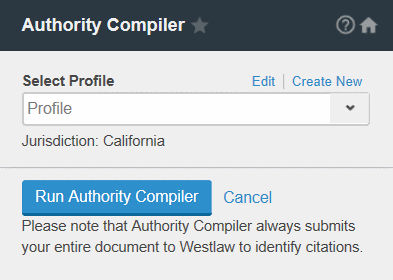
- If you are a new user, it is recommended that you define presets for common use cases using theProfileoptions. Profiles let you select, save, and reuse options you use frequently.
- Select the profile you want to use from theSelect Profilelist.
- SelectRun Authority Compiler.
- Each citation displays in a list in the left pane. You may unselect or select the authorities you want to append to your document. You have the following options:
- Select a section heading to include all authorities in a category (for example, Cases).
- Select a document's checkbox to include an individual authority.
- NON UNIQUEappears above non-unique citations, and lets you select one of the associated documents to include. Select the title of a document to view the document on Westlaw.
- Out of planappears next to citations that are not covered in your Westlaw subscription.
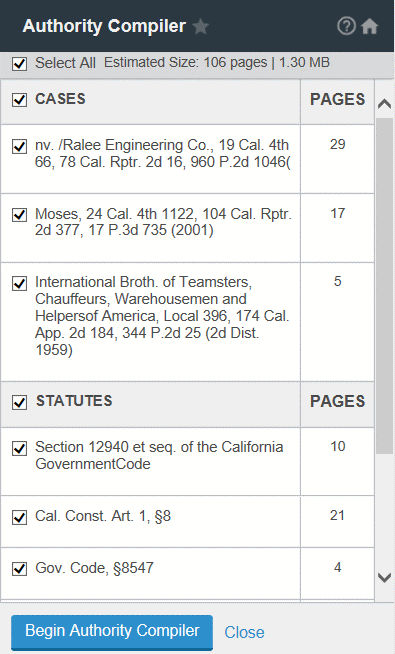
- SelectBegin Authority Compiler.
- Select the delivery format that you want for your compiled authority from theExport Settingslist (for example, Word Document, PDF). SelectContinue.
- SelectDownloadand select whether to save or open the compiled document with the appended authorities.
Billing occurs when the compiled document is downloaded. Charges may be incurred for appended authorities that are not covered in your Westlaw subscription.
In the compiled document, hyperlinked citations in the table of authorities go to the appended authority. Hyperlinked citations in the appended authorities go to the full text of the document on Westlaw.

