
Understand Flags
Review flagged document errors and inconsistencies, including defined terms, numbering, punctuation, phrases, dates, cross-references, open issues, and signature block discrepancies.
After analyzing your document, all potential errors and inconsistencies are displayed in the results pane.
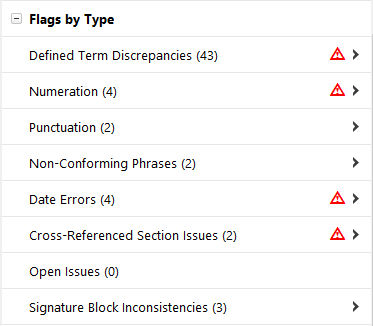
Defined Term Discrepancies
These flags show potential issues and inconsistencies in defined terms, including the following:
- Defined But Not Capitalized: A term is defined but not capitalized.
- Defined But Not Used: A term is defined but not used in the document.
- Defined More Than Once: A term is defined more than once in the document.
- Defined Term Location Misstated: A term is defined in the main document but references to the term incorrectly state the location of the definition.
- Out of Alphabetical Order: A term in the definition section appears to be out of alphabetical order.
- Undefined: A term is used with initial caps in the middle of a sentence but is not defined in the document. That is, the term appears to require a definition but is not covered in the definitions section of the document.
Numeration Discrepancies
These flags help ensure that you use consistent numbering throughout your document. Deal Proof also flags numbers that are out of sequential order.
Unpaired Punctuation
These flags help locate any unpaired punctuation in the document, including unpaired brackets, parentheses, and quotation marks. For example, unpaired punctuation might include using an opening parentheses or bracket but not the closing parentheses or bracket, or using an opening quotation mark but not a closing quotation mark.
Non-Conforming Phrases
These flags help you focus on any inconsistent language in the document. Deal Proof finds the conforming phrases in the document and checks to see that similar phrases and expressions are used consistently throughout the document.
For example, suppose it is important that your document always uses the expression “similar foreign, federal, state, or local statute.” In one instance, however, you use “foreign or federal” instead. Deal Proof flags the latter instance as a non-conforming phrase.
Date Errors
Flagged items will help identify dates that may need to be updated or corrected. Date Errors include incorrectly stated weekdays (
Monday March 5, 2019
), invalid dates (September 31
), or dates that are ambiguous because they are missing a specific year or day of the month.Cross-Referenced Section Issues
Internal Cross-References can often be made inaccurate by edits and revisions made during made to the document. If the target of a bookmarked cross-reference is deleted from the document, Word will create a field code error, which will be identified as an Invalid Cross-Reference.
Using Word bookmarking for internal cross-references is a helpful way to improve document navigation for the reader. Plain-text cross-references will be flagged so you can identify which references haven’t yet been bookmarked.
To help clarify which clause is being referenced drafters often indicate in parenthesis the title of the target clause (
Clause 22 (Indemnification)
). If the actual title of the referenced clause doesn’t match what is provided, the item will be flagged.For all cross-referenced sections, if corrections to the reference are required, select the correct reference from the dropdown to update the reference.
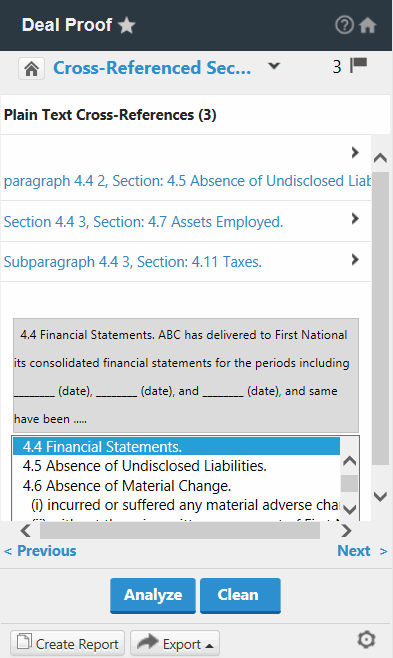
If the document contains auto-numbering, a link to the correct reference will be automatically created.
Open Issues
These flags show any blank spaces, multiple question marks, and dates or information that need to be finalized before the document is ready. Any open issues are flagged in brackets.
Open issues are identified as follows:
- Square/angle brackets (and the text between them).
- Bullet characters.
- Two or more consecutive uses of the letter “x,” except as document numeration.
- Question marks and other characters (# * @ ! $).
- Underscores or underlined spaces (if not found in the Signature Section of a document).
- Words or phrases identified as incomplete, where the language is inbold,italics, orunderlined.
Signature Block Inconsistencies
Key parties will be identified and compared to any signature blocks found in the document. Unidentified Key Parties are flagged if they are found in the signature block but haven’t been listed on a cover page or in the introductory paragraphs of the document. Key Parties identified in the document that don’t appear in the Signature Block by name are flagged as Unrepresented Parties.
Suppressing Flags
You can customize reports and results by suppressing certain flags.
Related Content
-
DealProof overview
Format: Article

