
Set KeyCite Limits
Use KeyCite Limits in WestCheck to filter case and statute results by category, helping you focus on the most relevant KeyCite information.
Use KeyCite Limits in the WestCheck tool to restrict your KeyCite results for cases and statutes. Limiting your results is helpful if you are interested only in specific categories of KeyCite information.
You can set KeyCite Limits to apply to all citations by setting and saving the Limits in WestCheck profiles. You can also set KeyCite Limits for individual citations using the
Limits
link under the KC
button once you extract a citation list.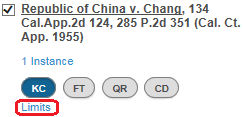
KeyCite Limits
Limits for Date, Content Type, Depth of Treatment and other filters are only applied to positive Citing References included in your WestCheck report. Negative Treatment can be limited by date.
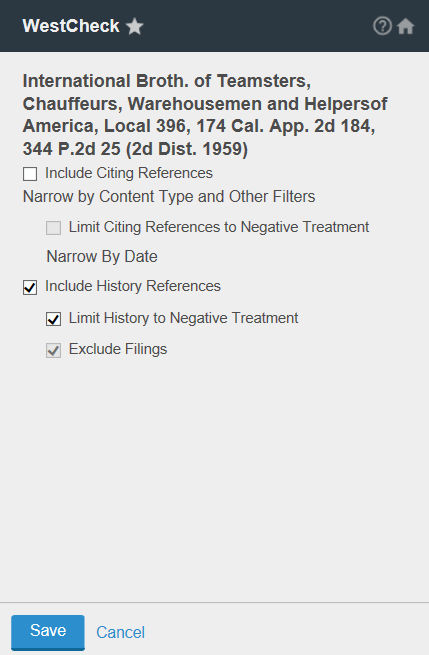
Cases:
- SelectInclude Citing Referencesto retrieve citing references for cases.
- SelectNarrow by Content Type and Other Filtersto further restrict citing references from displaying. Selecting this link provides options to filter citing references byContent Types,Depth of Treatment,Jurisdictions,Reported Status, andDate Range.
- If you selectInclude Citing References, you may also want to selectLimit Citing References to Negative Treatmentto retrieve only negative treatment citing references for the case.Narrow by Content Type and Other Filterswon’t apply to Negative Treatment. If you selectLimit Citing References to Negative Treatment, you may limit by Date Range.
- SelectInclude History Referencesto retrieve KeyCite history for cases. If you select this option, you may also want to selectLimit History to Negative Treatmentto retrieve only the negative treatment history for the case. If you select to limit the history, you can further select toExclude Filingsto retrieve negative history for the case but not include citations for related court documents.
Statutes:
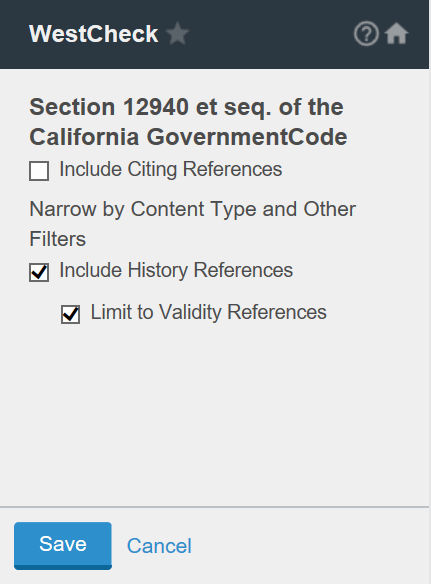
- SelectInclude Citing Referencesto retrieve citing references for statutes.
- SelectNarrow by Content Type and Other Filtersto further restrict citing references from displaying. Selecting this link provides options to filter citing references byContent Types,Depth of Treatment,Jurisdictions,Reported Status, andDate Range.
- SelectInclude History Referencesto retrieve statutory history, including proposed legislation, credits, and statutory and historical notes. If you select this option, you may also want to selectLimit to Validity Referencesto retrieve history for the statute but limit it to validity references.
Analytical & Law Reviews:
- SelectInclude Citing Referencesto retrieve citing references for analytical and law reviews.
- SelectNarrow by Content Type and Other Filtersto further restrict citing references from displaying. Selecting this link provides options to filter citing references byContent Types,Depth of Treatment,Jurisdictions,Reported Status, andDate Range.
Patents:
- SelectInclude Citing Referencesto retrieve citing references for patents.
- SelectNarrow by Content Type and Other Filtersto further restrict citing references from displaying. Selecting this link provides options to filter citing references byContent Types,Depth of Treatment,Jurisdictions,Reported Status, andDate Range.
- If you selectInclude Citing References, you may also want to selectLimit Citing References to Negative Treatmentto retrieve only negative treatment citing references for the patent.Narrow by Content Type and Other Filterswon’t apply to Negative Treatment.
- SelectInclude History Referencesto retrieve KeyCite history for patents. If you select this option, you may also want to selectLimit History to Negative Treatmentto retrieve only the negative treatment history for the patents. If you select to limit the history, you can further select toExclude Filingsto retrieve negative history for the patents but not include citations for related court documents.
Related Content
-
Check Citations
Format: Article

