
Page layout options
The graphic below illustrates the various page layout options available. Mark the
Duplex
and/or 2-Up
checkboxes in the Print
dialog to choose the desired options.note
Duplex and 2-Up printing are not available for embedded documents or embedded PDF files.
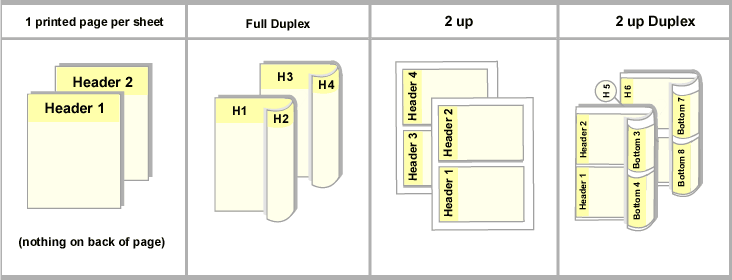
1 printed page per sheet will print with the header on top and nothing on the back of the page.
Full duplex will print with heading 1 on the top of page 1 and heading 2 on the top of the back of page 1. The second page will print with heading 3 at the top of the front of the page and heading 4 at the top of the back of the page.
2 up will print header 1 and 2 on the same page, with the headings along the left vertical side. Nothing prints on the back of the page.
2 up duplex will print header 1 and 2 on the same page, with the headings along the left vertical side. Headers 3 and 4 print in the same orientation on the back of the page.

