
FileCabinet CS option is grayed out or missing when printing
When the FileCabinet CS option is grayed out or missing in Accounting CS, Fixed Assets CS, Planner CS, Practice CS, UltraTax CS, and Workpapers CS try these troubleshooting steps.
After each step, try to print to FileCabinet CS again.
- In FileCabinet CS, go toHelp, thenAbout FileCabinet CS. Go to the Version column and make sure FileCabinet is up to date.
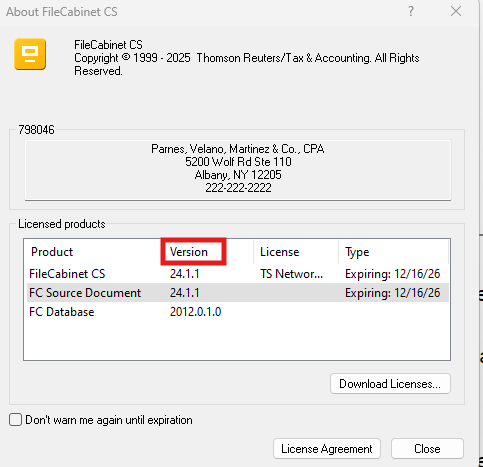
note
To download the latest version of FileCabinet CS, sign in to CS Professional Suite.
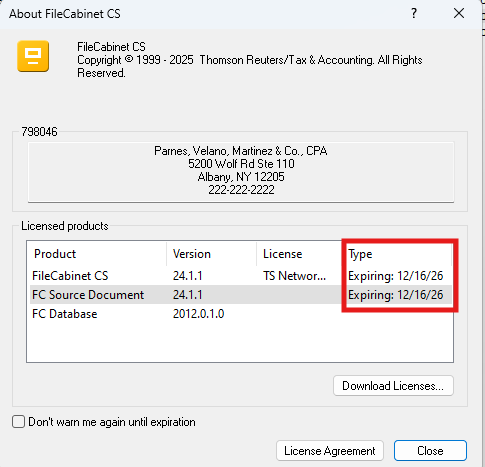
- In FileCabinet CS, go toHelp, thenAbout FileCabinet CS. Go to the Type column to make sure that your license isn't expired. If your license is expired, you won’t be able to print to FileCabinet CS.
- Make sure that the data locations in FileCabinet CS and the other CS Professional Suite application match.
- Rerun the desktop set up for FileCabinet CS.
- Clear the user's temporary directory.
- Register the FileCabinet CS dll file.
- Delete the user preference file.
- Go toHelpthenAbout FileCabinet CSto download and install licenses via CS Connect and restart the computer.

