
Determine the GoFileRoom Drawer and List ID
The Drawer and List ID of a particular drawer in GoFileRoom are critical pieces of information needed to configure the GoFileRoom Lookup List Sync Service or File Importer.
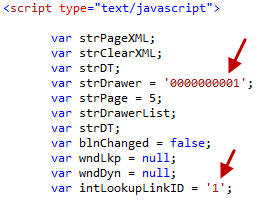
Each drawer in a GoFileRoom database is identified with a unique static 10-digit ID number. This Drawer ID value is needed when configuring GoFileRoom Lookup List Sync Utility and File Importer Utility. In addition, when an issue is identified that is drawer-specific, this value should be identified and communicated to development along with the DBID. The normal default value for a “Clients” drawer is 0000000001 but this is not guaranteed, so verification is important even in that circumstance (see the following example, the “Clients” drawer on DBID: 001 has a Drawer ID of 0000000018).
To obtain the Drawer ID and List ID follow these steps.
Microsoft Edge
- While signed in to the database via the GoFileRoom sign-in page, chooseAdministration, thenManage FileRoom. From here select theListstab, thenManage Lookup Lists.
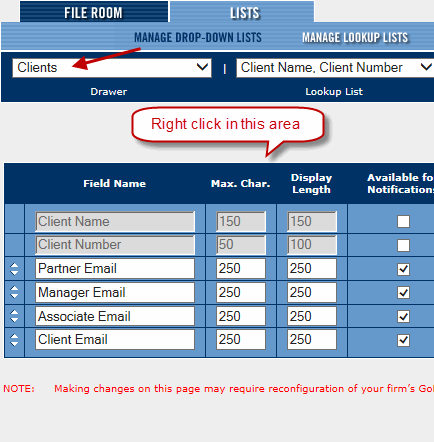
- Select the drawer from the dropdown list.
- Right-click anywhere in the blank area on the page and selectProperties.
- In the following image, the Drawer ID is 0000000001 and the List ID is 1 (lookuplinkid).
Chrome
- While signed in to the database via the GoFileRoom sign-in page, chooseAdministration, thenManage FileRoom. From here select theListstab, thenManage Lookup Lists.
- Select the drawer from the dropdown list.
- Right-click anywhere in the blank area on the page and selectView Frame Source.
- A new tab will open. In the following image, the Drawer ID is 0000000007 and the List ID is 4 (lookuplinkid).


