
Set up SurePrep
If you have administrative privileges, you can set up and configure SurePrep integration with GoFileRoom.
important
Before you start, make sure that GoFileRoom Support has enabled the integration for your firm.
- In GoFileRoom selectAdministration, then selectManage FirmFlow.
- Open theConfigurationtab.
- For Drawer, selectClients.
- For Service, selectTax.
- For Category, selectGeneral.
- MarkEnable SurePrep Integrationcheckbox.
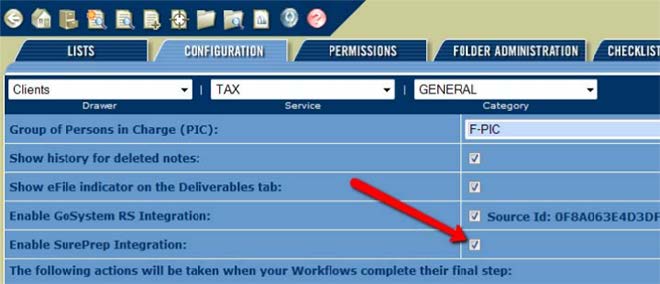
- SelectAdministration, then selectManage FirmFlow
- Select theListstab.
- For list, selectWorkflows and Steps.
- Name the workflowSurePrep Tax Return, then selectAdd.The name will appear in all uppercase letters in the Workflow pane.
- In the Workflow Steps section, enter steps in the available fields and selectAddafter each entry.The following steps are recommended:
- Project Setup
- Organize
- SurePrep(required)
- Preparation(required)
- Manager Review
- Review Comments
- Partner Review
- Assembly
- Signature
- Delivery
- Client Approval (E-File)
- Government Approval (E-File)
- Completed

note- Prior to workflows routing to the SurePrep step, a FirmFlow user need to be assigned to the SurePrep and Preparation steps.
- System-generated notifications are sent to the assigned user of the steps alerting them of the SurePrep Binder status.
- When configuring the SUREPREP TAX RETURN workflow, no step should be identified as the Scanning step and no step should be identified to receive the workflow after the Scanning step.
- Auto-routing will apply to this workflow through new technology on the backend, as part of this new integration.
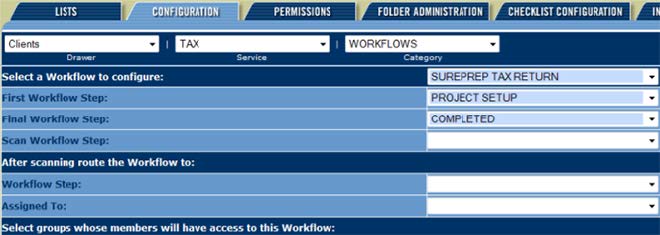
- SelectAdministration, thenManage Fileroom
- Select theListstab, then selectClients.
- Add new document types toFile Section: Individual Tax 1040
- --------SurePrep-------- (optional)
- Sureprep Source Documents (required)
- Dream Workpapers (required)
Repeat this for allFile Sectionsfor which SurePrep is used to sort the source documents, for example if you use SurePrep for any business returns.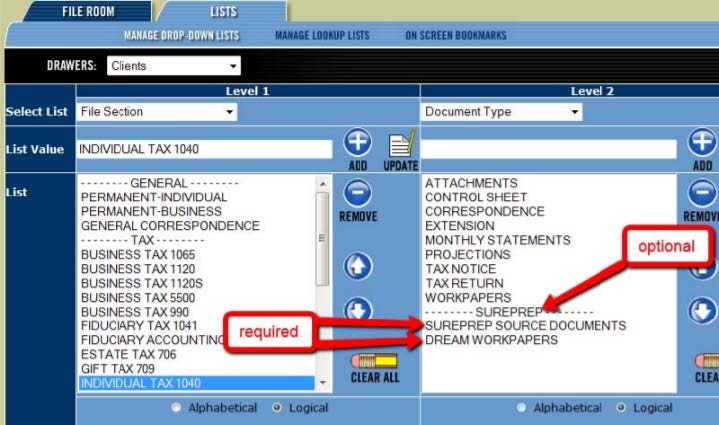
- Optional step: Create My Alerts and notification rules.
Next steps: Office manager or Tax department manager set up.
Related Content
-
Enable SurePrep for GoFileRoom integration
Format: Article

