
Edit previous versions of Word or Excel documents
If version control has been enabled for your organization, you can edit previous versions of a Word or Excel document if you have the appropriate access privileges.
Follow these steps to edit previous versions of a Word or Excel document from GoFileRoom.
- Perform a search.
- In theSearch Resultsscreen, mark the checkbox for the document you want to edit.
- Right-click and chooseVersion Controlfrom the context menu.
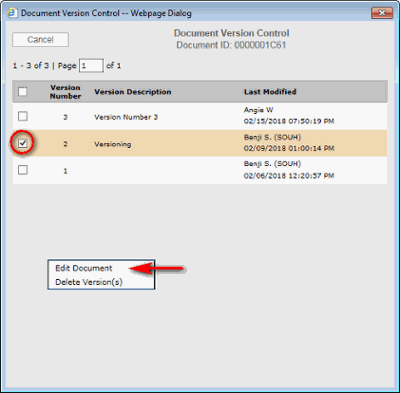
- In theDocument Version Controlwindow, mark the checkbox for the version that you want to edit, then right-click and chooseEdit Documentto open it in the source application.
- Close the document when you are finished editing.
- In theGoFileRoom Officewindow that opens, select one of the following save options.
- Save to GoFileRoom:If you Save to GoFileRoom, you can save the document using version control. To do so, mark theAs new version (v2)checkbox and add a description in theDescriptionfield.
- Save changes locally
- Ignore changes
- SelectOK.noteSave changes often when working in documents from within their source application.

