
Migrate documents between GoFileRoom drawers or databases
The Document Migration Service migrates documents from one GoFileRoom database or drawer to another GoFileRoom database or drawer, typically in a separate firm or business location. A GoFileRoom to GoFileRoom migration is normally the result of a firm acquisition, a firm merger, or a firm split. This document explains the migration process in detail.
Using the Document Migration Service
- Work with your Consultant on timing of when data can be backed up by Thomson Reuters.
- Prepare Client Number and File Section/Document Type cross reference.
- Work with your Consultant to determine how uploaded documents will be indexed in GoFileRoom.
Your documents will be ready for use within GoFileRoom when the migration process is complete.
What to expect from the document migration
The document migration process is customized based on how your firm currently stores documents in the GoFileRoom databases. Your firm should expect to commit some time to the migration process. The amount of time needed typically depends on the number of documents being migrated and the consistency in naming conventions used to store documents.
Due to differences in client numbering and GoFileRoom configurations between firms, cross-mapping information is required for client numbers, file sections and document types.
Confidentiality
We acknowledge that your firm will be sending confidential client information. Thomson Reuters and the Technical Services team will use the information solely to migrate documents in a secure environment so that the documents will be available to your firm. We treat all client information as confidential. We retain your source data for 60 days after providing your firm with a document reconciliation report to help you identify and manage any unprocessed data. For additional information, you can view our Privacy Policy from the bottom of any page on our website, CS.ThomsonReuters.com.
GoFileRoom Document Migration Service steps
Step 1: Scheduling your migration date
Upon receiving your signed agreement, Technical Services will contact you within three business days to confirm scope and schedule date to begin the migration. If you are migrating documents as part of a Guided Implementation, your Consultant will discuss timing with you. The typical turnaround time for the entire migration is four weeks from the time we receive your data.
Step 2: Preparing cross-mapping information
Technical Services will discuss preliminary information with you that your firm can compile to minimize the turnaround time for document migration. For more information, see the example of File Section/Document Type cross mapping at the end of this article.
For the fastest and most efficient migration, you should provide all migration information at one time. You must provide a single list containing all client numbers to migrate. We recommend that you designate a person at your office through which Technical Services will facilitate the migration.
important
Failure to properly prepare and send client data will result in the delayed processing of your migration.
Complete the following steps to obtain information needed to complete the migration.
- Send the release form, signed by both firms, to authorize the copying of documents to Thomson Reuters. Professional Services or your sales consultant will provide the release form to you.If this migration is a result of a firm split, firm will need to provide Thomson Reuters with a list of clients that are being migrated as they exist in the current database.
- Export your File Section/Document Type list from both databases so you can create a cross reference spreadsheet.
- If Client Numbers are changing between the two databases, create cross reference mapping for clients as well.
- Upload both documents to Technical Services via your secure location. Reach out to your Project Manager if you have not been shared a folder yet.
Step 3: Index mapping approval and migration
After indexes have been assigned but before migrating documents, we will provide your firm with a review spreadsheet that shows the proposed index mapping for all documents that will be migrated. At this point, your firm can make any necessary changes.
After your firm has given final approval on the index mapping, we can begin the document upload process. Depending on the number and size of the documents, the upload can take between one and several days. Technical Services can typically determine how long the upload will take before starting the process.
note
The maximum number of documents that can be processed per night is 30,000. However, the presence of multiple large documents (over 1GB) may reduce this number.
When the migration process is complete, you will be provided a spreadsheet that contains document filenames, indexing information, and GoFileRoom document IDs, which are assigned to all documents that are uploaded to GoFileRoom.
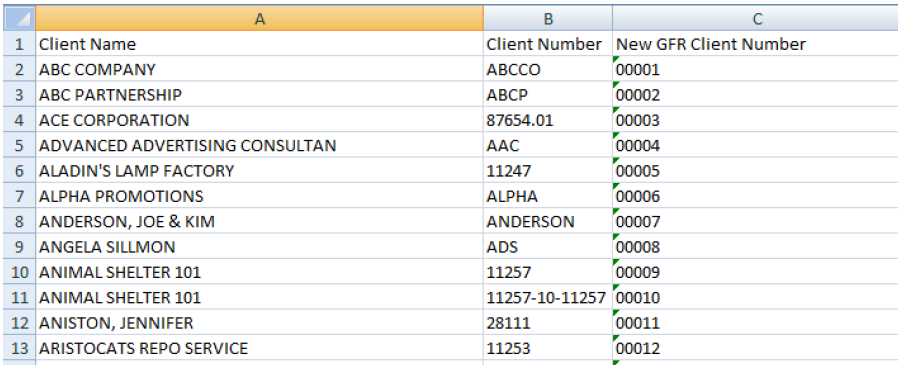
Client cross reference list example
note
If client numbers contain leading zeros, verify that the field is formatted as text.
File section/document type cross mapping example
You can refer to the following file section and period-end mapping example when determining how to index your documents in GoFileRoom.

Related Content
-
Request document migration services from Technical Services
Format: Article,
4 min read
Article,
4 min read

