
Approve or Edit Invoice Accounting Code Allocations in an Invoice
When an invoice is posted, the default accounting codes specified in the matter are associated with the invoice, but can be modified during invoice approval. If accounting codes are required and no defaults have been specified, the codes must be provided before the invoice can be finally approved.
Invoice accounting code allocations are managed on the invoice
Accounting
tab. You can:
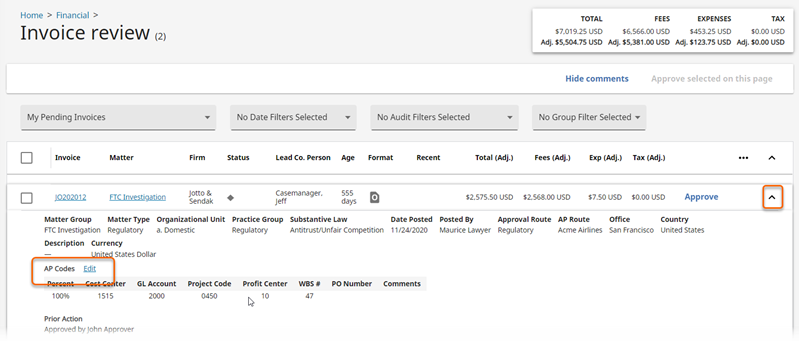
- SelectFinancial>Invoice Reviewin the left navigation.
- Select the down arrow to the far right of the relevant invoice.
- Next toAP codes, selectEdit.
or
- SelectFinancial>Invoice Reviewin the left navigation.
- Select the hyperlinked name of the invoice to open it.
- Select theAccountingtab.
- Enter the allocation information in the boxes in theInvoice tax configuration and cost allocationssection as appropriate.
- SelectBy amountorBy percentto switch between entering amounts as a percentage or as an amount.
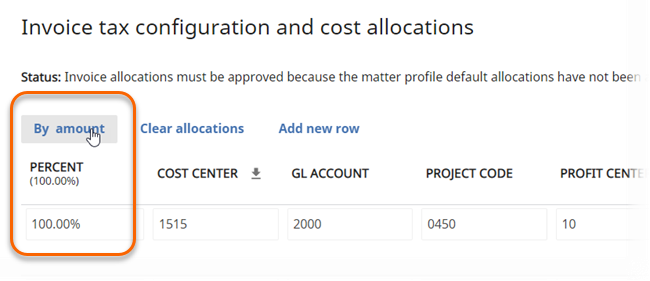 noteTo allocate an invoice with negative numbers, you must use amount, not percentage.
 - SelectAdd new rowto add more rows to accommodate additional accounting codes.
- At the bottom of the page in theOther invoice accounting detailssection, you can also provide a comment to AP.
- SelectSave & closeon the toolbar when you are finished.
Related Content
-
Accounting Codes Overview
Format: Article