
Approving, Editing, or Rejecting Budgets
Use the budgeting tools in Tracker to manage spending by law firms. If any required data is missing in a budget, the budget cannot be approved.
The Pending Budgets page (
Financial
> Budget Review
) shows any matter or matter group with a budget or with accrual data that requires review. If accruals are at the matter group level, only the matter group will be shown, not the matters assigned to the matter group. However, if at the same time a law firm matter budget has been modified for a matter assigned to a matter group, the individual matter is shown. The matter group will not be shown unless there is some independent reason for the matter group to be displayed on the page.Using this page
Change how the budget information is grouped
Click and drag columns to the
Drag a column header and drop it to group by that column
area.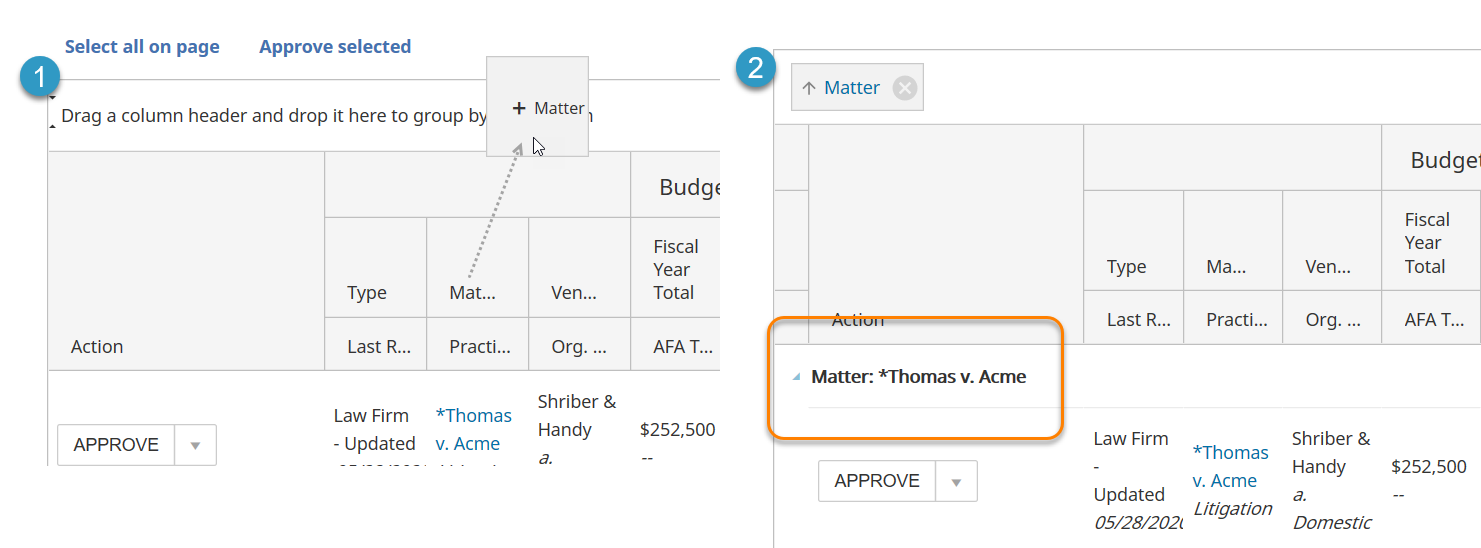
To remove a filter, click the X icon. 
Limit the number of pending budgets shown
Use the view selectors to filter by pending budgets, budget type, and/or date to filter by from the appropriate dropdown list, then click
Change view
Filter the View
To Filter by | Options |
|---|---|
Pending budgets | Select one of the following from the drop down list:
|
Budget type | Shows only the budget types of the selected type. You can filter by the available budget types:
|
Date filter | Displays only the budgets last revised within the chosen period for approval. The Date Filter options are:
|
Approve pending budgets
You can approve individual budgets, multiple budgets you select, or all budgets that appear on the page.
- ClickFinancial > Budget Reviewin the left navigation.
- SelectApprovein the dropdown to the left of each pending budget you want to approve.
- On the toolbar, selectApprove selected, orSelect all on pageto select all budgets at once.
note
Approved budgets no longer appear on the Budget Review page after it is refreshed.
Edit a pending budget before approval
- ClickFinancial > Budget Reviewin the left navigation.
- SelectEdit/Rejectin the dropdown to the left of each pending budget you want to edit.
- Update the budget information.
Field Reference
Section | Column | Description |
|---|---|---|
Budget | Fiscal Year Total | Total allocated fiscal year budget |
Budget | AFA Total | AFA totals are included if the firm has a flat/fixed/capped AFA and Matter Lifetime Costs is selected. The total is the sum of the firm's Flat/Fixed/Capped AFA total. |
Budget | YTD Total | The matter’s fiscal year-to-date total budget amount (fees + expenses) for the specific vendor |
Budget | Life Total | The matter’s total allocated budget with the vendor (fees + expenses) for the life of the matter |
Budget | YTD Fees | The matter’s fiscal year-to-date budget for fees with the specific vendor |
Budget | Life Fees | The matter’s total allocated budget (fees only) with the vendor for the life of the matter |
Budget | YTD Expenses | The matter’s fiscal year-to-date budget for fees with the specific vendor |
Budget | Life Expenses | The matter’s allocated budget (expenses only) with the vendor for the life of the matter |
Spending | YTD Total | The total amount already spent, fiscal year-to-date, across approved invoices and invoices in-approval for fees, expenses and tax on the matter with the specific vendor |
Spending | Life Total | The total allocated amount already spent, for the life of the matter, across approved invoices and invoices in-approval for fees, expenses and tax on the matter with the specific vendor |
Spending | YTD Fees | The total amount already spent, fiscal year to date, across approved invoices and invoices in-approval for fees on the matter with the specific vendor |
Spending | Life Fees | The total allocated amount already spent, for the life of the matter, across approved invoices and invoices in-approval for fees on the matter with the specific vendor |
Spending | YTD Expenses | The total amount already spent, fiscal year-to-date, across approved invoices and invoices in-approval for expenses on the matter with the specific vendor |
Spending | Life Expenses | The total allocated amount already spent, for the life of the matter, across approved invoices and invoices in-approval for expenses on the matter with the specific vendor |
Variance | YTD Total | The amount reflecting fiscal year to date spend amount minus (-) total budget amount for the fiscal year-to-date. |
Variance | Life Total | The amount reflecting spend life total minus (-) budget life total |
Variange | YTD % Spent | The percentage reflecting spend for fiscal year to date divided by budget amount for the fiscal year to date. The color indicates whether the amount is over or under budget:
|
Variance | Life % Spent | The percentage reflecting spend life total divided by budget life total. The color indicates whether the amount is over or under budget:
|
- ClickApprove budgeton the toolbar.
Reject budgets
- ClickFinancial > Budget Reviewin the left navigation.
- ClickApprovenext to each pending budget you want to edit and selectEdit/Reject.
- ClickReject budgeton the toolbar.