
Create UTBMS Audit Sets
UTBMS audit sets are guidelines that you define to control how Tracker handles expenses in LEDES invoices that do not conform to your billing guidelines. Tracker can flag, reduce, or reject the LEDES invoices that violate your guidelines. Tracker can find LEDES invoices with expenses that do not match your billing guidelines and take action according to audit rules you set up. Tracker uses the Uniform Task-Based Management System (UTBMS) expense codes.
note
The information in this topic applies only to LEDES invoices. It is not possible to apply these guidelines to non-LEDES invoices because they are not in a structured data format.
You can create as many audit sets as necessary and apply them to matters as desired. A new required field is created in the matter, and users will be required select an audit set when creating a matter. The audit sets will also be available for reporting in the Matter and Invoices report type.
note
The primary audit set will be used if:
- A user uses matter upload and doesn’t update the excel file to include theUTMBS Audit Setcolumn.
- The Matters API is used and the client doesn’t specify an audit set.
The primary audit set will be prepopulated in the matter when a matter is created in Tracker.
Create expense code audit rules
Tracker can flag, reduce, or reject any LEDES invoices that contain expenses that violate your guidelines. When you set up audit sets, you can:
- Flag the invoice by showing a warning.
- Automatically reduce the invoice to the approved rate. With this option you have the choice of unit limits or total limits to address different forms that expenses take.
- Automatically reject the rate (auto-reduce to zero).
- Reject the invoice outright.
Once you create a new audit set, it will be displayed in the list of audit sets on the UTBMS Expense Guidelines Audit Sets page.
note
When you create an audit set, a new required field is created in matters. Use caution when creating new audit sets, as you could potentially create audit flags for your existing matters.
- SelectSettingsin the left navigation.
- In theeBilling & Financial Setupsection, selectInvoice rejection & adjustment reasons, audits & guidelines.
- ClickLEDES Audits & Guidelines.
- SelectUTBMS Expense Guideline Audits. A list appears, showing any existing guidelines. If you already had one active audit set, it is called Primary and you can change this name.
- To edit an existing guideline, select its name in the list.
- To add a new guideline, clickAddon the toolbar.
- By default, theActivecheckbox is checked for each new set you create. You can check or clear this box to activate or reactivate an audit set.
- In theNamefield, enter a descriptive name for the audit set.
- For each expense that you want to include in the audit, enter a limit in either theUnit amountor theTotal amount (per line)field. This limit is applied to the respective line in an invoice, not to the invoice total. Specify one or the other, but not both.
- For each expense that you include in the audit, specify the type of audit.Types of AuditsTreatment in the SystemNone/DisabledThis audit is not turned on for the respective rule. This is the default for each UTBMS code.Red Flag/WarningA red flag is displayed for the respective audit. The billing guideline reviewer or the Level 1 approver must resolve the audit, and cannot proceed along the invoice approval route until resolved.Auto-reduce to currently approved rateTracker will automatically adjust the unit amount or total amount for the expense code to the respective limit that you defined in theUnit amountorTotal amountfield. ADescriptionfield will appear. The description you enter here will appear on the invoice audit for the respective invoice.Auto-reject rate (auto-reduce to zero)Tracker will automatically adjust the unit amount or total amount for the expense code to zero. ADescriptionfield will appear. The description you enter here will appear on the invoice audit for the respective invoice.Auto-reject invoiceTracker will reject the invoice.Descriptionfield will appear. The description you enter here will appear in the rejection comment for the respective invoice.
- On the toolbar, selectSave & close.
Examples
Copying expenses (Code E101) could have either a per-unit limit, such as $0.10/copy, or a total limit, such as $25 per line.
Example 1
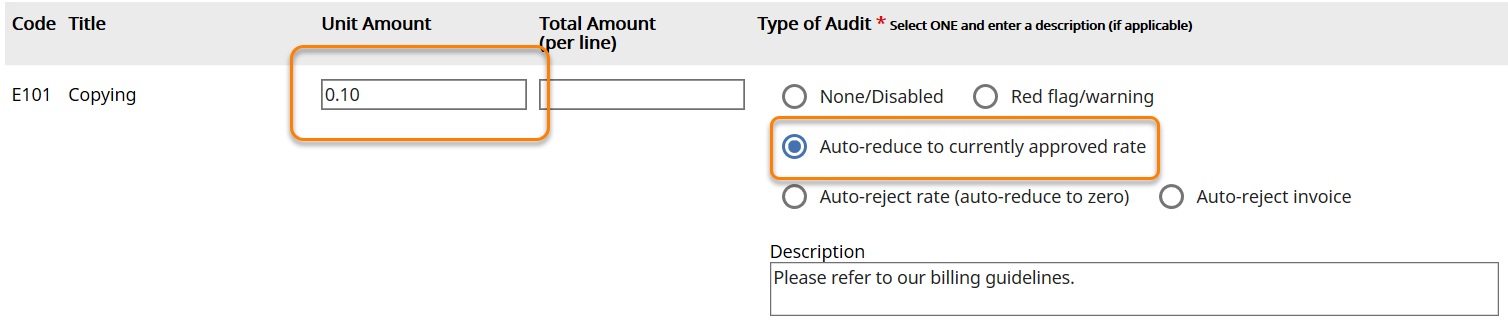
In the following example, Tracker will automatically reduce any invoice with a per-unit copying charge that exceeds ten cents per unit back to ten cents.
- Code: E101
- Title: Copying
- Unit Amount: 0.10
- Total Amount (per line): blank
- Type of Audit: Auto-reduce to currently approved rate
- Description: Please refer to our billing guidelines.
Example 2
In the following example, the limit for outside printing would be $25, so Tracker will automatically reduce any invoice with a line item total for outside printing that is more than $25.
- Code: E102
- Title: Outside Printing
- Unit Amount: blank
- Total Amount (per line): 25.00
- Type of Audit: Auto-reduce to currently approved rate
- Description: Printing beyond $25 is not covered.

Example 3
In the following example, word processing is not an approved expense and Tracker changes the rate for any word processing charges to zero.
- Code: E103
- Title: Word Processing
- Unit Amount: blank
- Total Amount (per line): 0.00
- Type of Audit: Auto-reject rate (auto-reduce to zero)
- Description: Per Acme Airline's billing guidelines, word processing is considered a law firm overhead and is not a permitted billing expense.

Cloning a UTBMS Audit Set
- SelectSettingsin the left navigation.
- In theeBilling & Financial Setupsection, selectInvoice rejection & adjustment reasons, audits & guidelines.
- ClickLEDES Audits & Guidelines.
- SelectUTBMS Expense Guideline Audit Sets.
- SelectCloneto the far right of audit set you want to clone.
- Make the necessary adjustments to the audit set.
- On the toolbar, selectSave & close.