
Set up Volume Discounts
Company System Administrators can enable, configure, and manage company-level volume discount settings and tiered arrangements that can be applied to matters.
On the Volume Discount Configuration Page
Required role | Company System Administrator
The
Volume Discounts
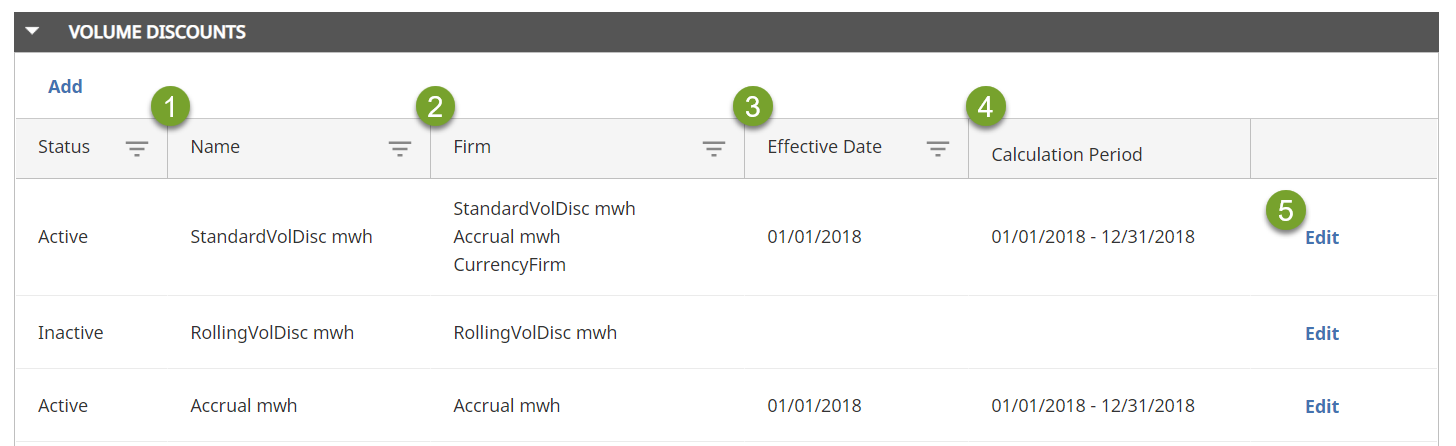
collapsible section shows any volume discount arrangements you have defined. Each volume discount arrangement consists of the following:
- Name
- Firm: A list of one or more firms that can be assigned to the volume discount arrangement for a matter
- Effective Date
- Calculation Period:
- Standard — the arrangement has a start date and an end date
- Annual from effective date
- Annual from January
- Rolling 12-month period
- List of discount spending tiers. SelectEditnext to an arrangement to open a new window that shows the tiers and lets you add tiers.
Enabling company-level volume discounts
To enable volume discounts for your company:
- SelectSettingsin the left navigation.
- In theeBilling & Financial Setupsection, selectVolume Discounts.
- Next toEnable Volume Discounts?, select an option. If you selectYes, additional options appear.
- Next toInclude Non Ledes Invoices?select an option.
- Configure the remaining settings, which will apply to all of your company's volume discount arrangements.
Field | Details |
|---|---|
Show message for 0% discount | Select Yes if you want to show the discount calculation message even when spend has not met a tier threshold and the discount is 0. Select No if you only want to show the message when spend has met a tier threshold and a discount applies. |
Discount Calculation Date | Select Date Posted (date the invoice posted to Tracker), Billing Period End Date (the invoice billing period end date), or Date Approved (the date the invoice was approved). |
Discount Calculation Amount |
|
Action Taken | Select Auto-Reduce (automatically apply the volume discount amount in the form of an invoice level adjustment to fees) or Warning (warn invoice approvers of the recommended discount ). |
Email notification to Tracker Coordinators two (2) weeks before a firm's standard volume discount arrangement is set to expire | Check this box if you want Tracker Coordinators to be notified before a volume discount is set to expire. This applies if there is no upcoming arrangement that take effect after the current one expires. |
- On the toolbar, selectSave & close.
Select which amount the discount will be applied to. The table below shows the adjustments that are included with each option.
Adjustment type | Adjusted Amount (include all adjustments) | Adjusted Amount (exclude company invoice-level adjustments) | Billed Amount (exclude all company adjustments) |
|---|---|---|---|
Firm fee item adjustments | Yes | Yes | Yes |
Firm invoice-level fee adjustments | Yes | Yes | Yes |
Company fee item adjustments | Yes | Yes | No |
Company-level invoice fee adjustments | Yes | No | No |
note
Company invoice discounts are not included in the calculation.
Add Volume Discount Levels
Keep in mind the following when setting up volume discounts:
- Volume discounts are based on cumulative spending.
- Volume discounts are a percentage of the invoice after adjustments are applied.
- You can set multiple tiers as necessary, for a maximum of 10 tiers.
- You can enter fractional rates up to two decimal places.
- Negative percentages are not allowed.
- Only whole numbers are allowed for currency rates.
- The highest tier has no ceiling limit.
To add volume discount levels:
- From the left navigation, selectSettings > eBilling & Financial Setup > Volume Discounts.
- In theVolume Discountscollapsible section, selectAdd.
- In theDiscount Informationcollapsible section, enter the basic information about the discount, such as the name of the discount and the firm to which it applies.
- SelectNew Tiered Arrangement. New fields appear that let you enter basic information about the arrangement, including the start and end dates.
- ClickAdd New Tier. New fields appear that let you define the tiers of the arrangement.
- In theDiscount Ratefield, enter the amount, as a percentage, to be discounted.
- In theSpend Rangefield, enter the adjusted invoice amount to which this discount will be applied. For example, you could configure a 10% discount to be applied to invoices between $100,000 and $200,000.
- ClickAdd New Tierto define additional discount levels. You can define as many levels as necessary. For example, you could add an additional tier of a 12% discount for invoices over $200,000.
- On the toolbar, selectSave.
No-Limit Tiers
You must enter a value for the highest tier, but it can be any value. When you select
Save
, Tracker changes the amount to No Ceiling
.Update a volume discount Arrangement
You cannot edit a volume discount arrangement directly. However, if you create a new tiered arrangement with a time period that overlaps an existing one, the new arrangement is active and the previous arrangement becomes inactive. If you create a tiered arrangements with time periods that do not overlap, both arrangements are active.