
Dataset Relations & RTP Posting
Dataset Relations lets you automatically update the Tax Provision through the calculation and posting of RTP true-ups. For the system to post RTP adjustments, you must relate a dataset with Tax Return data (contains the filed tax return data) to the same or previous period dataset with Provision data (final provision data), and a same or future period Target dataset (current year tax provision).
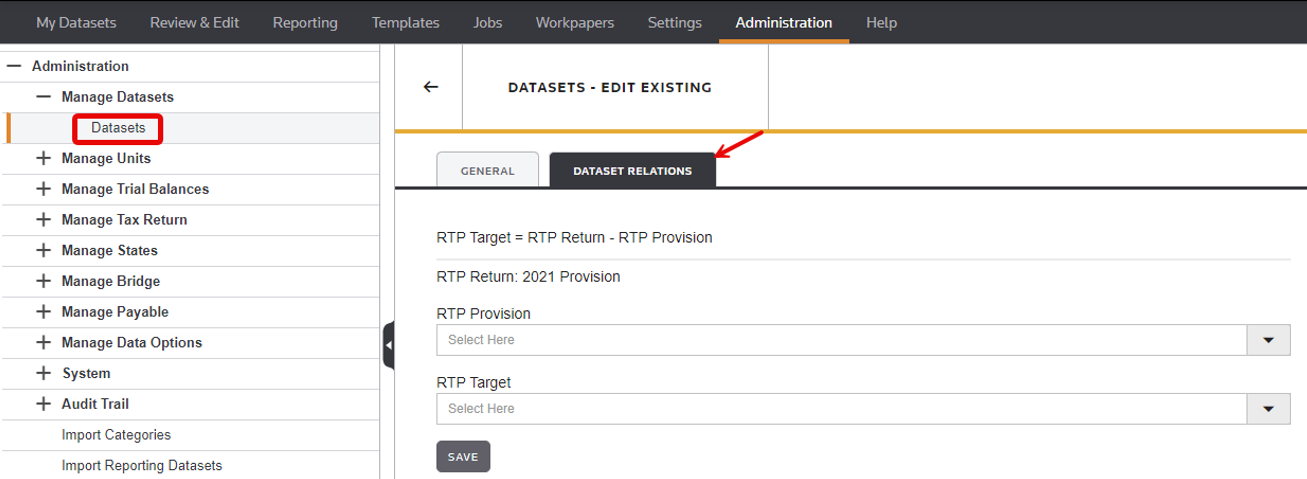
In the Tax Return (PROV) dataset, you set up the relationship between the tax return (
RTP Return
), final provision (RTP Provision
) and current provision (RTP Target
) within the Dataset Relations
tab.- RTP Return: A PROV type dataset with the filed tax return data.
- RTP Provision: A PROV type dataset with the final tax provision data.
- RTP Target: A PROV type dataset with the current year's tax provision data.
For RTP adjustments to be posted, a Tax Return dataset (RTP Return) that has the filed tax return data must be related to:
- The same or previous period dataset with Provision data (RTP Provision) (final provision).
- The same or future period Target dataset (current year tax provision).
The system posts True-ups to the current year Tax Provision (target dataset) using Non-Cash Tax Adjustments (for the current) and Deferred Only adjustments (for the Deferred). Through the use of parameters, the system also allows you to post multiple RTP adjustments to a single RTP Target dataset.
note
- This feature is only available in a PROV (Provision Dataset).
- Set up and edit the relationship between datasets in theDataset Relationstab.
- To access theDataset Relationstab, select Datasets, then click the edit (pencil) icon next to a dataset.