
Valuation Allowance Rates
You can use the Automation Policies policy,
Valuation Allowance Rates
, to post amounts automatically for deferred tax assets, based on a pre-determined percentage.- The system generates the valuation allowances and appears as a contra asset in reports.
- The system determines the Automation on aSeparate Attribute,Aggregated Attribute, orAggregated Attribute Post-Tax Basis. See the Valuation Allowance functionality table below.
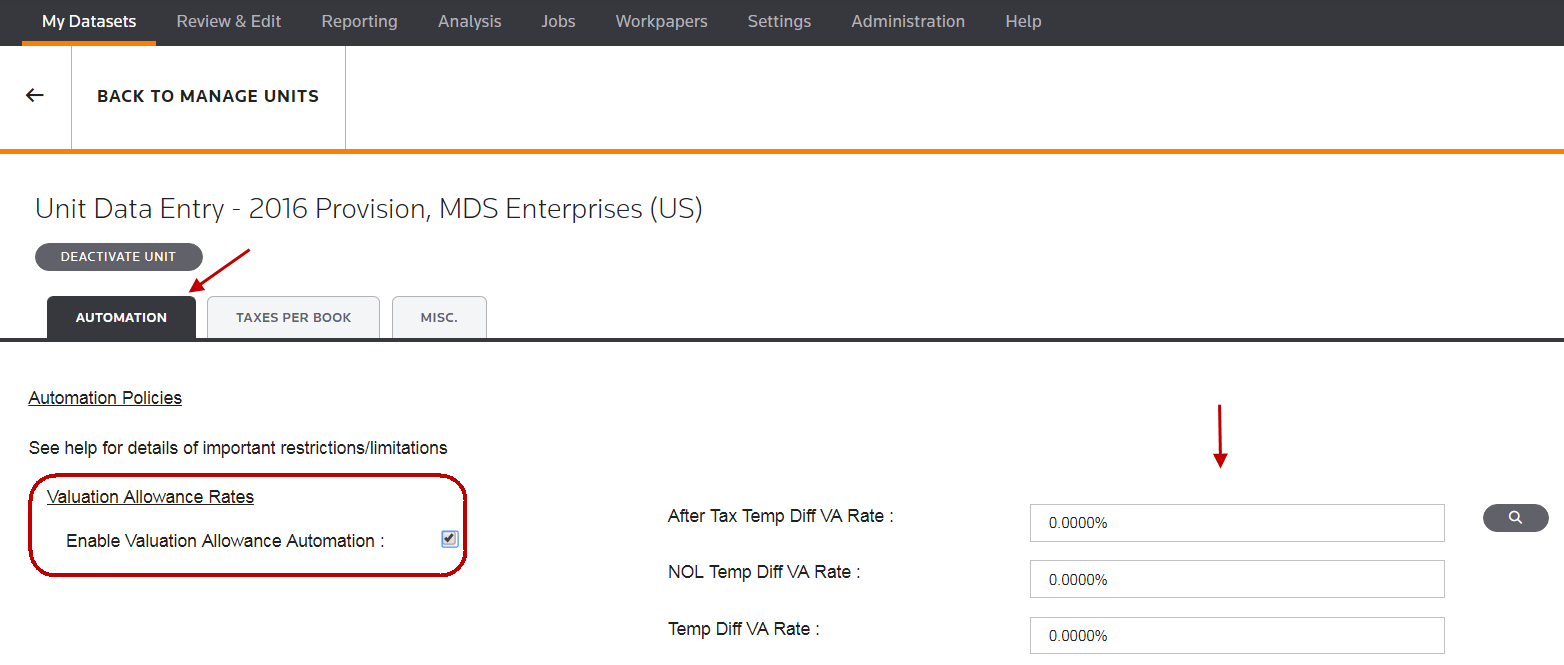
To activate the
Valuation Allowance Rates
for a unit:- SelectMy Datasets > Units > More > Other > Automation > Enable Valuation Allowance Automation.
- Type theVA Rates.
Valuation Allowance functionality | Notes |
|---|---|
Separate Attribute Basis | By default, the system uses the Separate Basis Valuation Allowance to calculate the valuation allowance. In the Automation Policies page, you can enter rates to calculate the valuation allowance for After Tax Temp Diff , NOL Temp Diff , and Temp Diff .
|
Aggregated Attribute Basis | Use the Aggregated Valuation Allowance functionality to combine the three component types and determine if a net asset will have an offsetting valuation allowance.
|
Aggregated Attribute Post-Tax Basis | Use the Aggregated Post-Tax Valuation Allowance functionality to combine the three component types and determine if a net asset will have an offsetting valuation allowance.
|
Converting from Aggregated to Aggregated Post-Tax | Converting from the Aggregated Attribute to Aggregated Attribute Post-Tax Basis :important
If you need to convert from the Aggregated Attribute to Aggregated Attribute Post-Tax Basis, please contact your client manager or Platform and Support's Customer Center.
|