
Base Dataset Summary
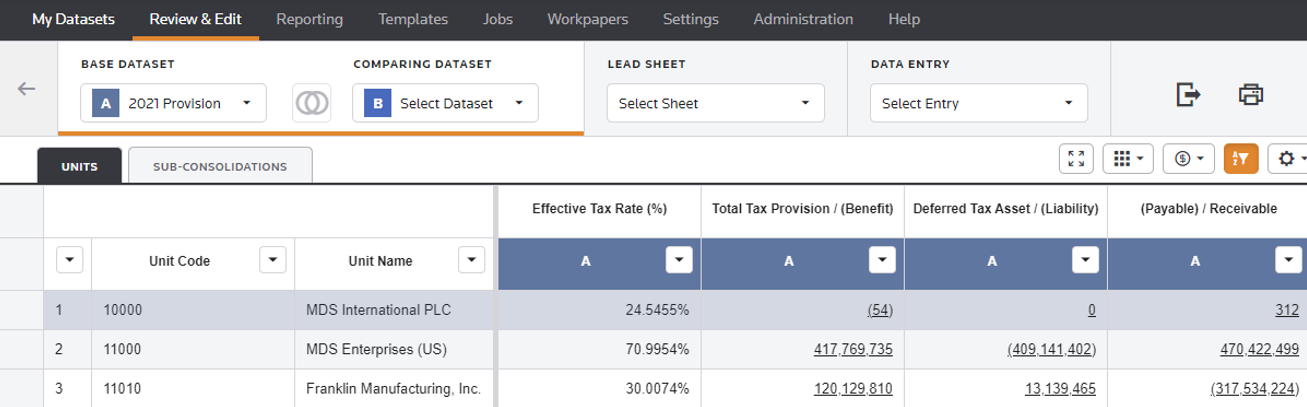
In the Summary page, you can review your data on a Unit basis or a Sub-Consolidation basis.
- Use the Effective Tax Rate and LEAD SHEET columns to review data, and access underlying detail for multiple datasets in one place.
- Use the Data menu options to refresh, export, and print data in the grid.
- Use the grid buttons and filters to determine the data to view in the grid for the Effective Tax Rate, Total Tax Provision (Benefit), Deferred Tax Asset (Liability), and (Payable) Receivable columns.
To review the summary data for your UNITS and SUB-CONSOLIDATIONS.
- Select aBASE DATASETto see all UNITS and SUB-CONSOLIDATIONS that are active for that dataset. UNIT and SUB-CONSOLIDATION tabs list the Codes and Names of your UNITS and SUB-CONSOLIDATIONS. The Datasets that appear in the BASE DATASET and COMPARING DATASET lists reside in My Review List.note
- In the SUB-CONSOLIDATIONS tab, you can contract/expand the list of sub-consolidations. You also have the ability to contract some sub-consolidations while keeping others expanded.
- Use the first column, to Sort, Filter, and Search, as well as Select All units
- Select aCOMPARING DATASETto compare data with the BASE DATASET.
- Select
 to view data for Reporting or Local currency.
noteBy default, the system uses Local currency in the Summary page. When viewing data using the Local Currency, if the BASE or COMPARING DATASET selected has units with different currencies, a warning message appears.
to view data for Reporting or Local currency.
noteBy default, the system uses Local currency in the Summary page. When viewing data using the Local Currency, if the BASE or COMPARING DATASET selected has units with different currencies, a warning message appears. - Select aLEAD SHEETto review the Provision, Deferred or Payable Lead Sheet data.noteIn the Summary page, select the summary values with hyperlinks for Provision, Deferred or Payable to view that underlying detail on the Lead Sheet.
- Select aDATA ENTRYcomponent to review and edit data for all jurisdictions (Federal, State, Province, All Other, and City).noteIn the Summary page, selecting the summary values with hyperlinks opens up the Lead Sheet. Selecting a hyperlink in the LEAD SHEET lets you see the DATA ENTRY component detail for that Summary value.
Review & Edit - Summary Page
See Grid Options for more information about the data navigation bar and grid options.