
Batch Printing - Other Options
Other Options includes several sections of more print options,
General Options
, Batch Print Options
, and Home Office Options
. - General Options - This section applies to unique situations and is rarely used.
- Include Voided Notices– Will include voided notices in the batch.
- Keep Notice Copies Together– Will print all recipients of the same notice in order. Only include notices not previously printed – Will include only notices that haven’t already been printed.
- Batch Print Options - This section applies to all notices that are notices to be sent to a folding machine.
- Batch Printing for Folding– Identifies the batch as one to be sent to a folding machine.
- Max Page Count– Identifies the maximum copies of any individual notice.
- Flip Images 180 Degrees– Allow the image to be turned in order to automatically stuff envelopes.
- Include Cover Sheet– Will print a cover sheet between each specified request.
- Include Mailing Sheet– Will print a mailing sheet for each notice.
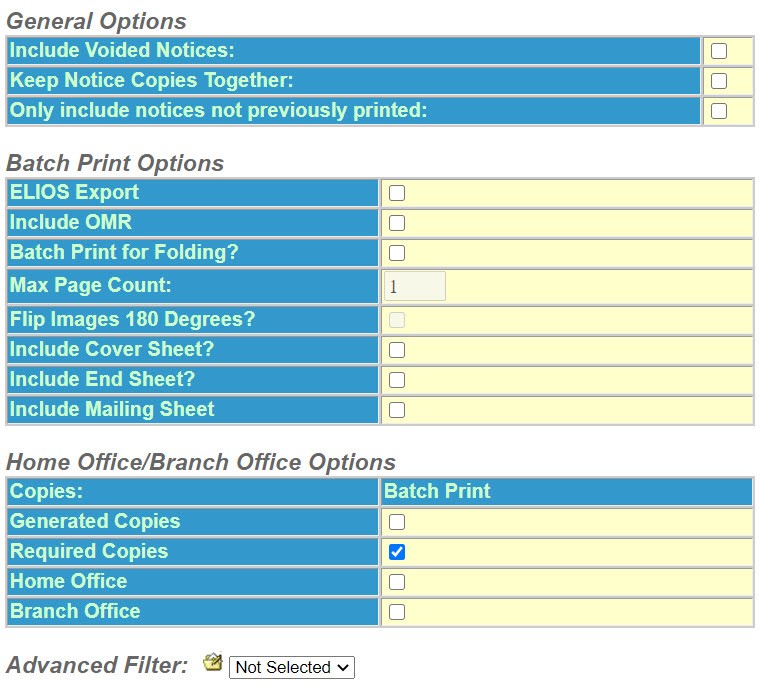
- Home Office/Branch Office Options - This section allows batch printing of just Home/Branch office copies.
- Copies– Batch Print.
- Generated Copies– Will batch print only home/branch office copies that have been generated.
- Original Copies– These are the required copies.
- Home Office– Select only home office copies.
- Branch Office– Select only branch office copies.
Advanced Filter – Filters policies and notices outside and in addition to the Limiting Conditions.
Continue to Batch Printing Notices.