
Batch Printing
From the
Main Menu
, select Batch/PO Log
.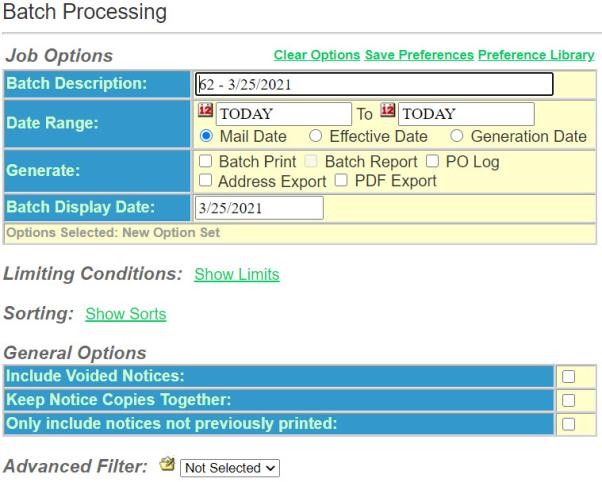
- In theJob Optionssection enter the following items:
- Enter aBatch Description. This is a descriptor that allows you to discriminate between the particular Batch/PO Log requests you create. This example is for a Daily Batch Print.
- Select aDate Range. In this example the date range is from Today to Today. This searches the data base and finds every notice that has a mail date of today.
- Generate- Select the type of batch print for this request. For this example selectBatch Print.
- Select theBatch Display Date, if applicable. This applies only to a Post Office Log.
- Limiting Conditions. You can limit what is printed by limiting your selections.
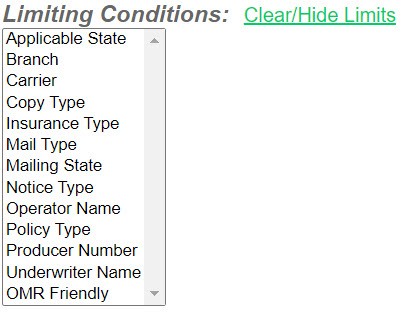
- SelectShow Limits.
- Applicable State– Will print only those notices that have a particular state chosen.
- Branch– Only those notices produced for a particular branch.
- Carrier– Only those notices produced for a particular insurance company.
- Copy Type– Only those notices going to a particular recipient.
- Insurance Type– Personal or Commercial.
- Mail Type– Only those notices that have been selected to be mailed in a particular manner. (Standard, Mail Certificate, Certified, etc.)
- Mailing State– Only those notices where the mailing addresses include particular state(s).
- Notice Type– Only specified notice types. (Cancellations or Nonrenewals, etc.)
- Operator Name– Only those notices created by a particular operator.
- Policy Type– Only those notices done for a particular policy type such as Auto or Package.
- Producer Number– Only those notices with a particular producer number.
- Underwriter Name– Only those notices assigned to a particular underwriter.
- When you are done selectClear/Hide Limits.
- Continue to the next sectionCopy/Type.