
Creating a Notice - Mail and Termination Date Information
The next screen is the
Mail and Termination Date Information
screen. 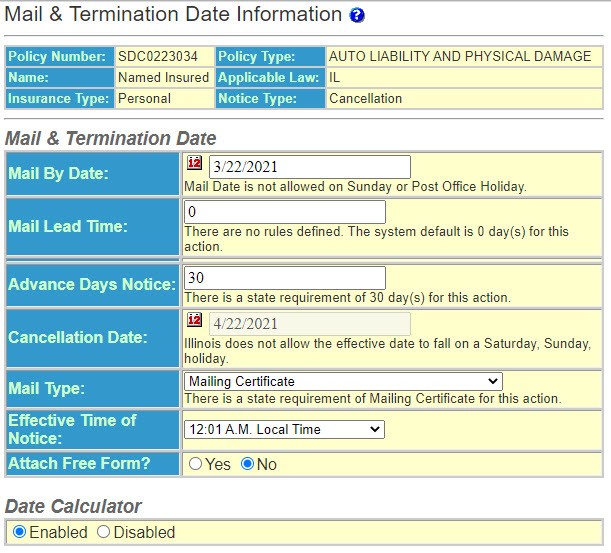
Enter or select the following options. Options vary depending upon the notice type.
Warning – If there are additional requirements regarding the notice, Policy Terminator will alert you. It will appear at appropriate places to advise a user or warn them of additional information. For example, the warning may advise a user to refer to ODEN State Rules & Regulations, to attach loss history to the notice, or advise how return premium should be handled.
- Mail By Date – The date the notice will be mailed. In cancellation, the program assumes the current date. The system pre-fills this field with the earliest valid mailing date based on the rule base, user defined Invalid Mailing Dates and the Mail Rollover Hour.noteIf a policy is within the underwriting period, theMail By Datefield cannot be modified on this page.
- Mail Lead Time - The number of required mailing days. The system pre-fills this field from one of two places: ODEN® rule base, if there are statutory requirements or the Mail Lead Days system default.
- Advance Days Notice – The number of days notice required by the state or your policy provisions. If the state has no requirement and custom advance days notice have not been entered inUtilities, the program will default to 0 and the days notice must be entered manually.
- Cancellation Date – The effective date of the notice. (Based on a specific notice type.)
- Expiration Date - The date the policy is expiring as entered in the policy information. This is applicable only to Conditional Renewal, Non-Renewal and Renewal Premium notice types.
- Mail Type – How the notice should be mailed. This will pre- fill with state requirements or your company default.
- Effective Time of Notice - This will pre-fill with your company default.
- Attach Free Form? – Allows you to attach a previously set up Freeform attachment. This could be a vehicle list, loss information or any other additional information.
- Notice Period Warnings - A notice period warning and appears only if it is applicable to the particular state, policy type and the type of notice being generated.
- Date Calculator – This feature that automatically calculates the important dates on the notice based on statutory requirements, system defaults and/or user supplied data. When the Data Calculator is enabled certain fields are 'grayed out' so that they are not editable. These fields include calculated fields and fields that contain information on which decisions have been based. This feature is designed to protect the user from incorrectly modifying data that has a significant and direct impact on the compliance of the notice. Details about how the Date Calculator determines dates is defined under each notice type heading below.Disabling the Date Calculator makes all date fields editable. In this mode no calculations are performed and as such the Mail Lead Time and Advanced Days Notice fields are 'grayed out' and ignored. You can manually editing theMail By Dateand theEffective Date.noteExtreme caution should be used when disabling the Date Calculator because no statutory rules regarding the effective date or mailing date of the notice are enforced. We recommend using this option only if you are absolutely certain you fully understand the ramifications of this actions.Conditional Renewal, Non-Renewal & Renewal Premium NoticesFor a notice of conditional renewal, non-renewal or renewal premium, theEffective Dateis predetermined to be the expiration date of the policy as specified on thePolicy Editpage. TheMail By Dateis then calculated by using the following formula:Mail By Date = Effective Date - Advanced Days Notice - Mail Lead Time - 1Once the Mail By date is determined, the Date Calculator checks to see if additional days need to be subtracted from the Mail By Date to account for state specific regulation. For example, some states require that the Mail By Date be moved back by one day if the Effective Date falls on a holiday.Finally, the Date Calculator determines whether the Mail By Date is a valid mail date based on ODEN® rules and user-defined Invalid Mailing Dates. If the Mail By Date is not valid, the date is moved back one day and reevaluated until a valid date is found.
- You can manually edit theMail Lead Timeand/orAdvanced Days Notice. Editing either of these fields automatically triggers the Date Calculator to reevaluate theMail By Date.
- On the side menu, selectContinue.