
Navigation
Moving Around
Use the [Tab] key to move from one field to another, or move directly to the field of choice with your mouse.
Menu Buttons
The menu is located on the side of the page. To select a menu option, place the mouse pointer on the button and click or use the hot keys by pressing the
ALT
key and the letter that is underlined on the menu button.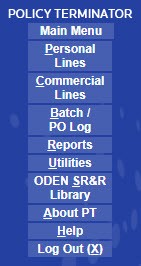
Menu Item | Description |
|---|---|
Main Menu | Returns you to the Main Menu page |
Personal Lines | Opens the Personal Lines Policy Locate page |
Commercial Lines | Opens the Commercial Lines Policy Locate page. |
Batch PO Log | Opens batchprint or post office log (Generates a USPS compliant post office log of all the notices that apply to the specified date range and limiting conditions. It is designed to acompany the notices to be stamped by the post office as a mailing record.). |
Print Options - User Specific | This menu option allows you to set your own notice print options. This option displays only if the system has been configured to allow user defined print options. |
Reports | Opens the Reports section of web-based Policy Terminator®. |
Utilities | This menu option is to access and/or add users and data needed for WebPT (for example, User ID's, Producers, Branches, etc.)This section is controlled by user rights. If you cannot access this section, contact your system administrator. |
ODEN SR&R Library | This menu option links to the ODEN Online website where you can find summaries of law regarding insurance topics. If you are unable to access this website, please contact your administrator for assistance. |
Change Password | This menu option allows the user to change their password. This option displays only if the change password option is enabled in Group Options under the Security Defaults section. |
About PT | Displays current information about the web-based Policy Terminator® software. |
Help | Opens the Help topics for web-based Policy Terminator® |
Log Out | Logs you out of the web-based Policy Terminator system® |
Icons
Icon | Name | Description |
|---|---|---|
 | Edit | Select to edit a record |
 | View Only | Select to view a record |
 | Search | Select to find a record |
 | View/Edit Notes | Select this to view/edit notes |
 | Delete | Select this to remove a notice |
 | Void | Select this to void a notice |
 | Select | Select this to choose a record |
 | Calendar | Select this to choose a date |