
Notice History Detail
The
Notice History Detail
page displays policy information entered at the time a notice was generated. It also displays the basic notice information, mail by date information, the date the notice was last printed, record activity, and notice copies.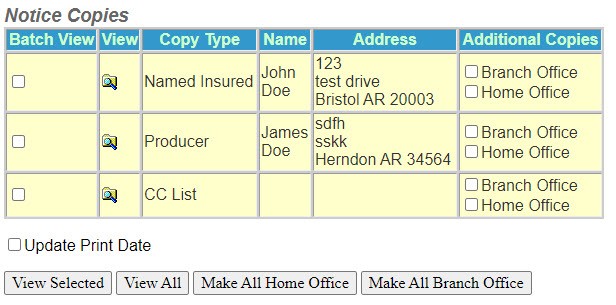
Batch View - This field indicates which notice copies have been selected to view when you select
View Selected
.View - The View icon allows you to preview the notice that is listed in history.
Copy Type - Displays the name of the party that received a copy of the notice.
Name - Displays the name of the party who received a notice.
Address - Displays the address of the party who received a notice.
Additional Copies - Displays the Branch and Home office options that allow additional copies of the notice to be printed.
Update Print Date - This option changes the date the notice was last printed. If this field is not checked, the last print date is not updated even though the notice may have been printed.
View Selected - This option is to view and print notice copies by selection.
View All - This option is to view and print all notice copies.
Make All Home Office - This option is to view and print notice copies and label them as Home Office copies.
Make All Branch Office - This option is to view and print notice copies and label them as Branch Office copies.
Printing a Notice from History
- Select theMagnifying Foldericon next to the copy type of the notice. This displays the notice in the Adobe Acrobat® window.
- Select thePrintericon located in the tool bar at the top of the page.