
Policy Locate
When you select either
Commercial
or Personal Lines
the first screen you see is the Policy Locate
screen. This screen lists all the policies for that line which are in the system. You can edit or create a notice on an existing policy or add a new policy record from here.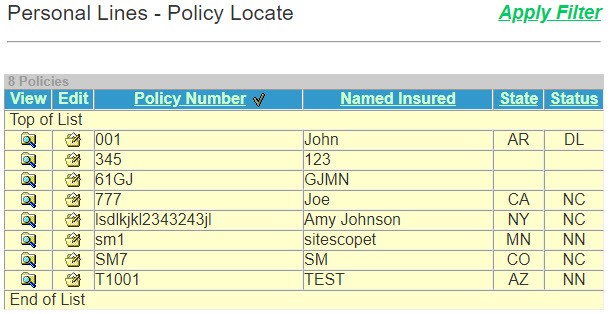
The
Policy Locate
page contains the following information:Feature | Description |
|---|---|
Apply Filter | If filters are set up in Utilities , Data Setup , you can choose this option. |
View | Select  to view the current policy record. This option displays the notice history of the policy. to view the current policy record. This option displays the notice history of the policy. |
Edit | Select  to edit the current policy record. This option does not display the notice history. to edit the current policy record. This option does not display the notice history. |
Policy Number Check | The policy number and can be sorted numerically. |
Named Insured | The named insured and can be sorted alphabetically. |
State | The state where the policy is issued and can be sorted alphabetically. |
Status | The status of the policy. |
On this screen you can:
Search for an existing policy by
Insured's Name
. Search for an existing policy by
Policy Number
.