
Adding Rating Territories for Tracking Two Percent Rule
Add rating territories if tracking the 2% rule in required states (NY, NJ and HI).
The states of New York, New Jersey and Hawaii have two-percent limitations on motor vehicle insurance termination's. Policy Terminator provides calculation of these limitations based upon policies written for particular territories or zip codes within these states. Policy Terminator® provides three levels of 2% tracking:
- Disable - Prevents the tracking of notices that fall under the 2% rule
- Loose - Tracks notices that fall under the 2% rule and notifies the user when the 2% limit is about to be exceeded but will not prevent the generation of the notice.
- Strict - Tracks notices that fall under the 2% rule and prevents the user from generating a notice when the 2% limit has been reached.
note
In order for the Loose and Strict settings to work properly, the
2% Policies Written
table must be populated.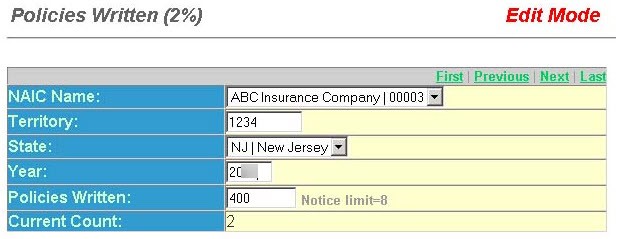
- Select the NAIC Name from the drop-down list. This is the name of the carrier.
- Enter the appropriate Territory. This field displays the insurer's rating territory for the applicable state.
- Select the State from the drop-down list or scroll down to the desired entry and click the Tab key.This field displays the applicable state(HI,NJ,NY) for the 2% rule.
- Select theYearfor the year the 2% rule applies. This year should be the last full calendar year.
- ThePolicies Writtendisplays the number of policies written by the selected carrier for the year selected.
- TheNotice limit =displays the total number of notices that can be generated.
- TheCurrent Countdisplays the current number of generated notices where the 2% rule applied.