
Export Status
This option displays the status of both processed or scheduled exports.
From the
Data Transfer
menu, select Export > Export Status
. 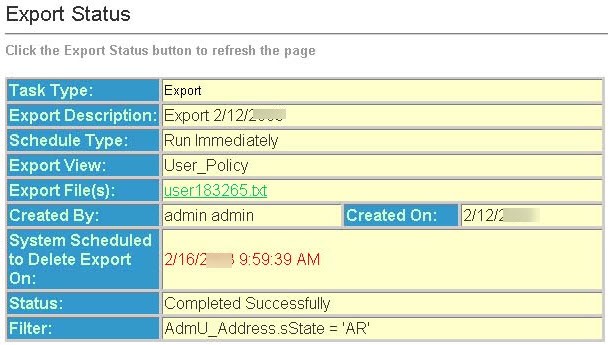
Field | Description |
|---|---|
Task Type | Displays the type of task |
Export Description | Displays the description of the task and the current date. |
Schedule Type | Displays the scheduling status. |
Export View | Displays the table from which the export will occur. |
Export File | Displays a link to the generated export file. The name of the link corresponds to the name entered in the "File" field when creating the export task. Clicking on the link allows viewing of the file. Right-clicking on the link, and choosing "Save Target As…" (or "Save As…"), saves the file to a local hard-drive as a text (.txt) file. |
Created By | Displays the user who created the task. |
Created On | Displays the date the task was scheduled. |
System Scheduled To Delete Task On | Displays the scheduled date and time for task deletion if the task ran correctly. Recurring tasks are never deleted; however, the associated log and text files are deleted according to the group options setting Delete Task Files after XX Hours. |
Status | Displays the task status. The following is a list of the valid status's: |
Status Descriptions
Status | Description |
|---|---|
Scheduled for processing | Task is in the queue, and will be processed as soon as possible. |
Processing record X out of X | Task is executing and has processed X records out of X records. |
Completed Successfully | Task executed with no warnings or errors. |
Completed no records to process | Task did not execute because if no records to process. |
Failed | Something fatal happened and the task was unable to execute at all. |
Scheduled… | Is a recurring task that is scheduled to run at the specified date and time. |
Filter - This field displays the filter expression that was used.