Group Options - Additional Options
Use the following sections to define additional options for the group.
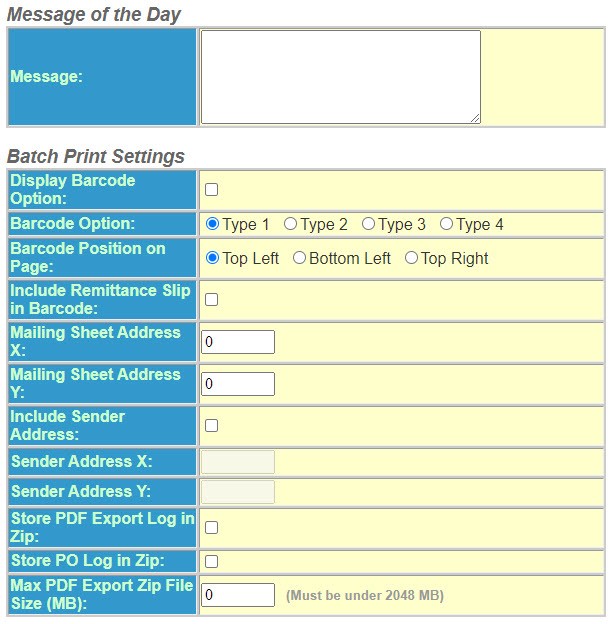
- Enter theMessage of the Day, if applicable. The message will be seen by all users who log in to the program.
- Select theBatch Printing Settingsthat apply:
- Display Barcode Option – Select this option to print the barcode above the address on the notice.
- Mailing Sheet Address X – Determines the X coordinate for placement of the name and address on the mailing sheet.
- Mailing Sheet Address Y – Determines the Y coordinate for placement of the name and address on the mailing sheet.
- Select theInclude Sender Addressto print the address on the notice.
- Sender Address X – Determines the X coordinate for placement of the name and address on the mailing sheet.
- Sender Address Y – Determines the Y coordinate for placement of the name and address on the mailing sheet.
- SelectStore PDF Export Log in Zipto store the export log in a zip file.
- SelectStore PO Log in Zipto store the PO log in a zip file.
- Enter a value for theMax PDF Export Zip File Size (MB).
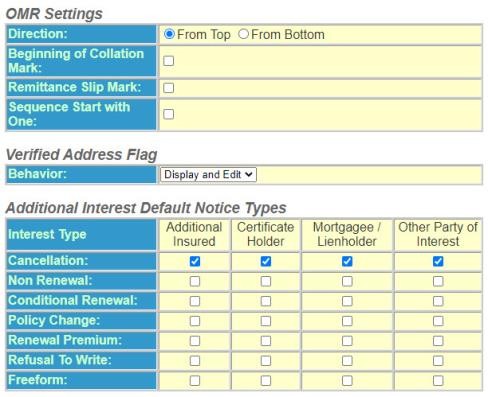
- Select theOMR Settings,Verified Address FlagandAdditional Interest Default Notice Typesthat apply. Policy Terminator defaults to send copies all cancellation notices to the Additional Interests. If you wish to default other notice copies to send to the Additional Interest, mark the notice types.