
Group Options - General Information, Print Defaults, Print Actions
Use this screen to define default values and options for this group.
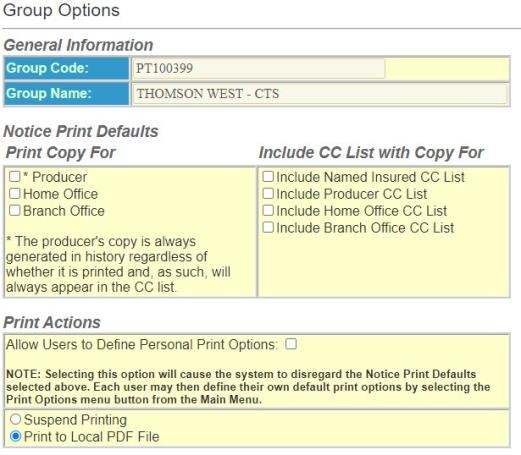
- InGeneral Information:
- Group Code – The Group Code assigned to the account by ODEN or your System Group Administrator.
- Group Name – The Group Name assigned to the account by ODEN or your System Group Administrator.
- User-Defined Fields – Fields that can be added and used to track information not captured in the existing Policy Terminator program.
- In theNotice Print Defaults Print Copy For- The following options set the print defaults for all users in the group.
- Producer – Print a copy of the notice to send to a producer or agent.
- Home Office – Print a copy for Home Office files.
- Branch Office – Print a copy for Branch Office files.
- Include CC List with Copy For- Select the parties who will receive a list of notice recipients.
- In thePrint Actionssection:
- Allow Users to Define Personal Print Options – Allows the user to ignore the Group defaults and set their own defaults.
- Suspend Printing – Sets the default to print all notices done in a given period of time to print in one batch.
- Print to Local PDF File – Sets the default to print each notice as it is generated.
- Continue to the next section Mailing Defaults.