
Group Options - Notice Defaults
Use this section of Group Options to determine defaults for notices for the group.
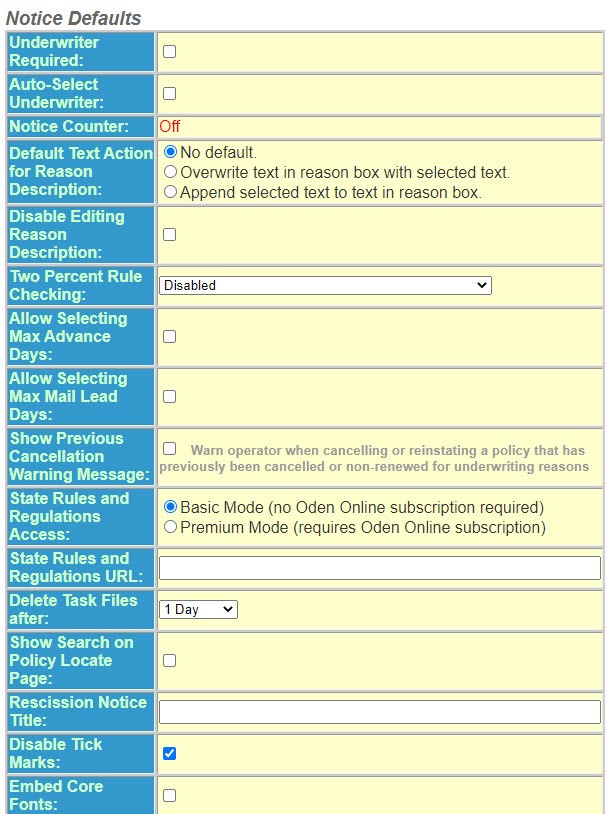
- Check this optionUnderwriter Requiredso that a notice will not be generated unless an underwriter name is selected.
- SelectAuto-Select Underwriterif you want to allow the Users name, if the User is also entered as an Underwriter, to automatically default.
- ToggleNotice CounterOn or Off – This applies to ODEN clients who have USB dongles and pay by the notice. ClickReplace Donglebutton when the USB dongle has been replaced.
- Select the option forDefault Text Action for Reason Descriptionthat applies to this group. This controls how wording is changed or added to theReason Description.
- No default– Text will overwrite anything previously entered.
- Overwrite text in Reason box with selected text- Text will overwrite anything previously entered.
- Append selected text to text in Reason box– Text will be added at the end of previously entered text.
- Select theTwo Percent Rule Checkingfrom the drop-down list. This option determines if Policy Terminator is to track cancellation and nonrenwals in those states with the 2% rule.
- Disable– Disables the feature.
- Loose– Policy Terminator will alert the user that they have exceeded the number of notices but will allow the notice to be generated.
- Strict- Policy Terminator will alert the user that they have exceeded the number of notices and notices will not be generated.
- SelectAllow Selecting Max Advance Daysif you want Policy Terminator to default the greater of the company advance days notice or the advance days notice pre-filled by ODEN.
- SelectAllow Selecting Max Mail Lead Daysif you want Policy Terminator to default the greater of the company mail lead days notice or the mail lead days notice pre-filled by ODEN.
- SelectShow Previous Cancellation Warning Messageif you want to warn the user that a previous cancellation or reinstatement notice has been issued.
- Enter theState Rules and Regulations URL(Authentication Server Only) If applicable. The URL address is the direct access URL to the ODEN State Rules and Regulations from the Policy Terminator. Contact your IT Department for more information.
- SelectDelete Task Files afterfrom the drop-down list. Set this to determine how long you want temporary task files to be available in the program.
- SelectShow Search on Policy Locate Pageif you want the user to havePolicy Numbersearch andNamed Insuredsearch on thePolicy Locatescreen.
- Continue to the next sectionSecurity Defaults.