
Group Options - Security Defaults
Use this section of Group Options to determine
Security
defaults for the group.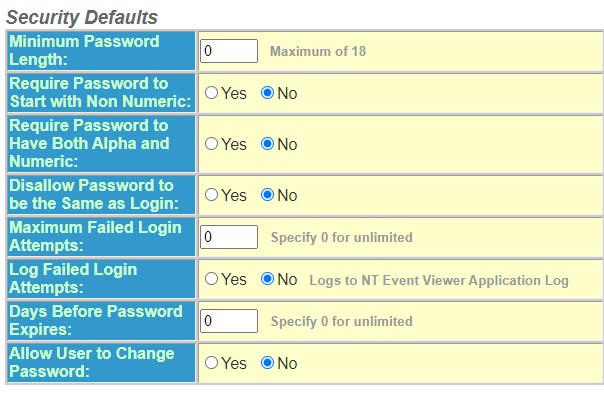
Select the password criteria for your group from the following options:
- Enter theMaximum Password Length. It can be up to 18 characters.
- SelectYesorNotoRequire Password to Start with Non-Numericcharacter.
- SelectYesorNotoRequire Password to Have Both Alpha and Numericcharacters.
- SelectYesorNotoDisallow Password to be the Same as Login.
- Enter a number for theMaximum Failed Login Attempts. Enter zero (0) for unlimited attempts.
- Select theLog Failed Login Attempts option for your group –YesorNo.
- Enter a value forDays Before Password Expires. Enter Zero (0) for no expiration.
- Select theAllow Users to Change Passwordoption that applies to your group –YesorNo.