
Set up and authenticate
Follow these steps to set up and authenticate the Data Query single sign-on (SSO) Add-in:
- Go to theONESOURCE Data Querytab.
- Select tab.
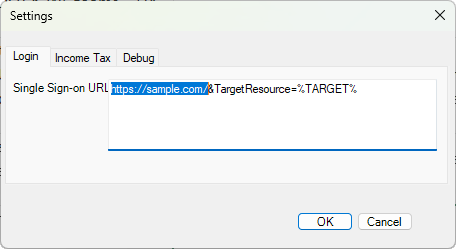
- Remove thehttps://sample.com/and replace with the organization's custom SSO URL.
- Go to theIncome Taxtab.
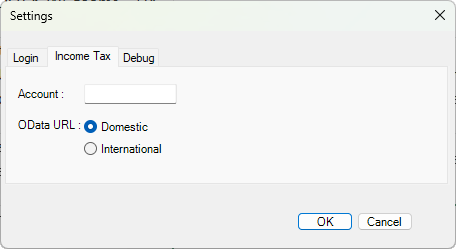
- Account: Leave blank (unless you're working within a firm using a client manager account).
- Scope: This defaults toDomestic. Change toInternationalto access International OData APIs.
- SelectOK.
- SelectAuthenticate.noteThe option to authenticate becomes available after saving the SSO URL.
- Complete the single sign-on prompt, then selectOK.