
Add a status template
To create a status template:
- Sign in to ONESOURCE DataFlow.
- SelectSetup, thenStatus Templates.
- SelectAdd Template.
- Enter aStatus Template Nameon theStatus Managementscreen.
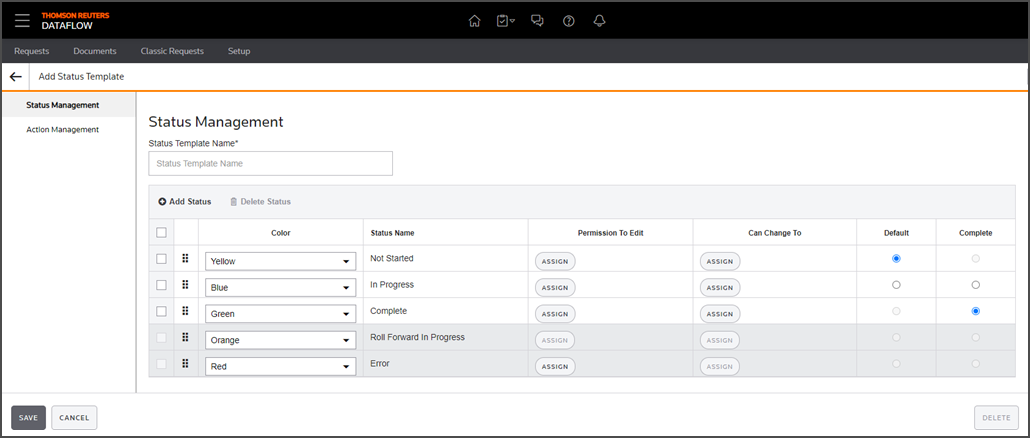
- SelectAdd Statusto create more statuses. Each new status template has default names and colors, which you can modify as needed.
- Set 1 status as theDefault Status. This is the status of the request when it is first created.noteThe default status can't be the same as theComplete Status.
- Set 1 status as theComplete Status. This status makes the DataFlow request read-only.noteThe complete status can't be the same as theDefault Status.
- SelectAssignto assign users or groups to this status.
- Permission to Edit: Users or groups can edit requests for this status.
- Can Change to: Users or groups can change statuses on requests. Users will only see statuses they are authorized to change to in the Change Status list for a request using this template.
- noteRoll Forward in Progress: This is a system status. You can adjust its color coding.Error Status: This is a system status. Assign a user authorized to move the request out of an error state. Without this, the request can't be resubmitted or acted upon until resolved.
- SelectSave.