
Add an action to a status template
Automated actions can be integrated into each status template. This lets an ONESOURCE DataFlow request automatically capture activities and progress through steps with minimal intervention, streamlining the process.
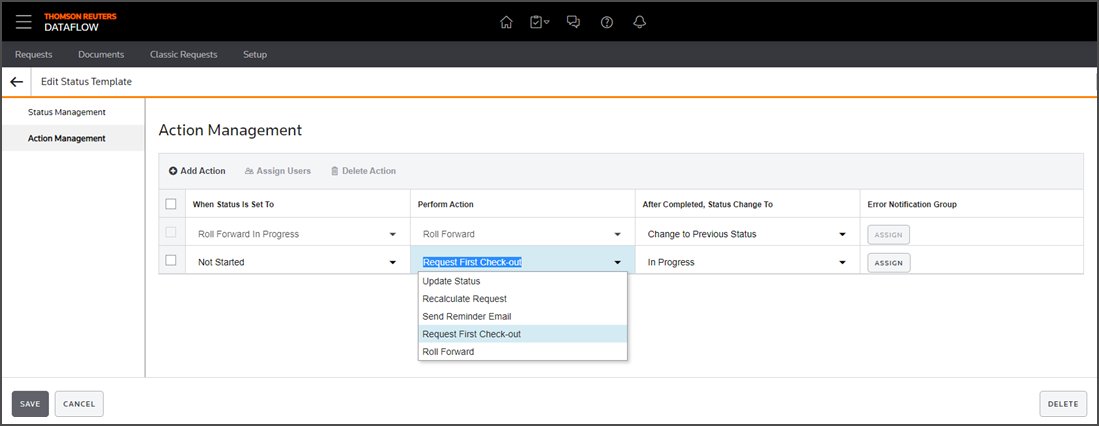
- Identify statuses:
- When Status is Set To: Select the statuses defined in Status Management for this template.
- Perform Action: Select the actions you want to associate with the template.
- After Completed, Status Change To: Specify the status to which the request should revert after the action is completed.
- Error Notification Group: Assign users and groups who should be notified if an error occurs during the action.
- Set actions to occur inPerform Actionwhen a request reaches a certain status.
- Update Status
- Recalculate Request
- Send Reminder Email Request
- First Checkout
- Roll Forward: This is the default action. When a user initiates aRoll Forwardon a request, its status automatically changes toRoll Forward in Progress. This prevents further actions until the process completes. Once finished, the status reverts to what it was before theRoll Forwardbegan.
- Select the status inAfter Completed, Status Change To. This sets the status the request should revert to after an action completes.