
Documents
ONESOURCE DataFlow documents or attachments are stored in a centralized document management location in the ONESOURCE Platform. You set permissions to manage these documents on the
Documents
tab in ONESOUARCE Administration
.To set permissions:
- Sign in to ONESOURCE Administration and edit a user.
- SelectProduct Permissions, thenDocuments.
- Select theDataFlowcheckboxes forView,Add, andDownload.
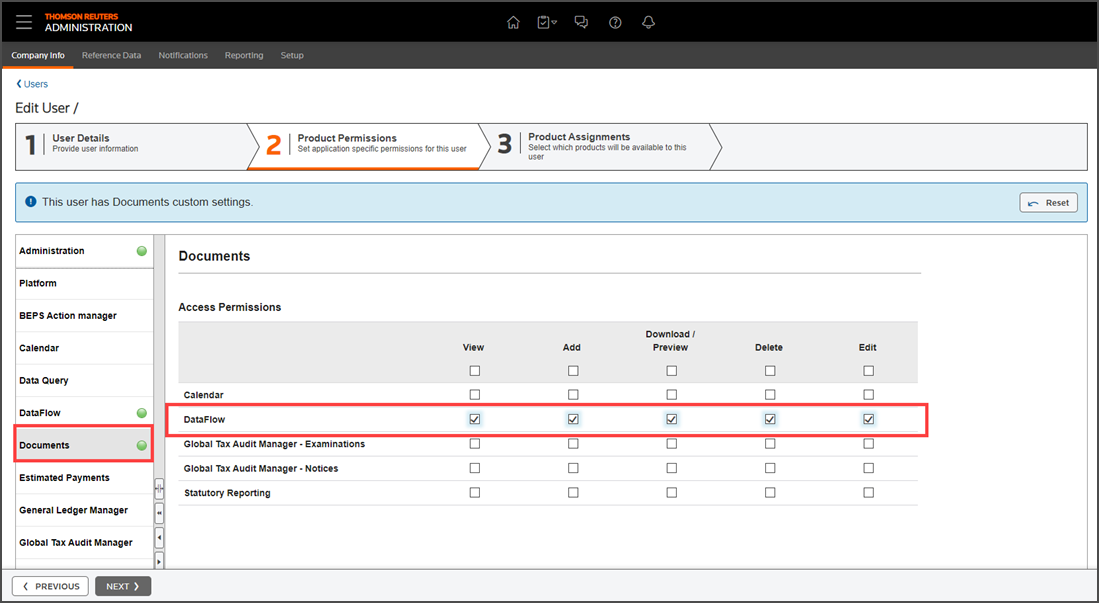
- SelectNext.
- Go to the ONESOURCE Workflow Manager section on theProduct Assignmentstab.
- Select theDataFlowandDocumentscheckbox for a regular user.
- Select theData Providercheckbox for a data user.
- SelectDone. This will send an email to the user to sign in and complete registration.