
ONESOURCE DataFlow permissions
You can assign more granular permissions to regular users by selecting one or more checkboxes from each section. Go to
ONESOURCE Administration
, Product Permissions
, then DataFlow
. Use the DataFlow Admin
and Data Provider
sections to enable a standard set of permissions. 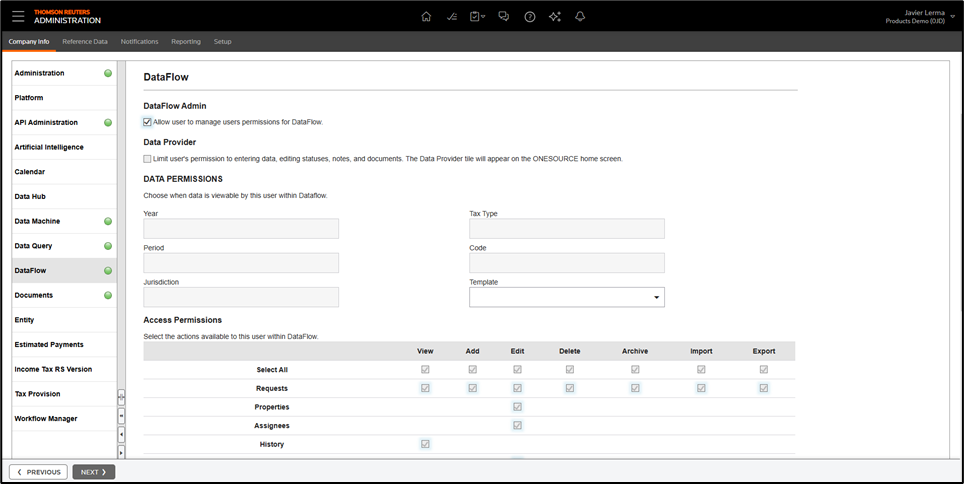
Data permissions
Users can view all data in the Data Permissions section by default. If you don't set any permissions, users have access to everything. For example, if you don't select a year in the year dropdown, you can view and manage requests for all years. But if you check 2018 and 2019, they'll view and work with requests from those years. Other years won't be visible to them.
Data provider
Select
Data Provider
to set permissions for a user. This action turns off all other options because Data Provider permissions are pre-set and can't be changed. As a Data Provider user, they can only access requests assigned to them.Access permissions
In the Access Permissions section, select the permissions for each user. We recommend granting
View
, Add
, Edit
, Import
, and Export
permissions, as these are typical for regular users.Give
Delete
and Archive
permissions only to a limited set of users. Make sure you give all users the necessary permissions so they can perform actions in DataFlow.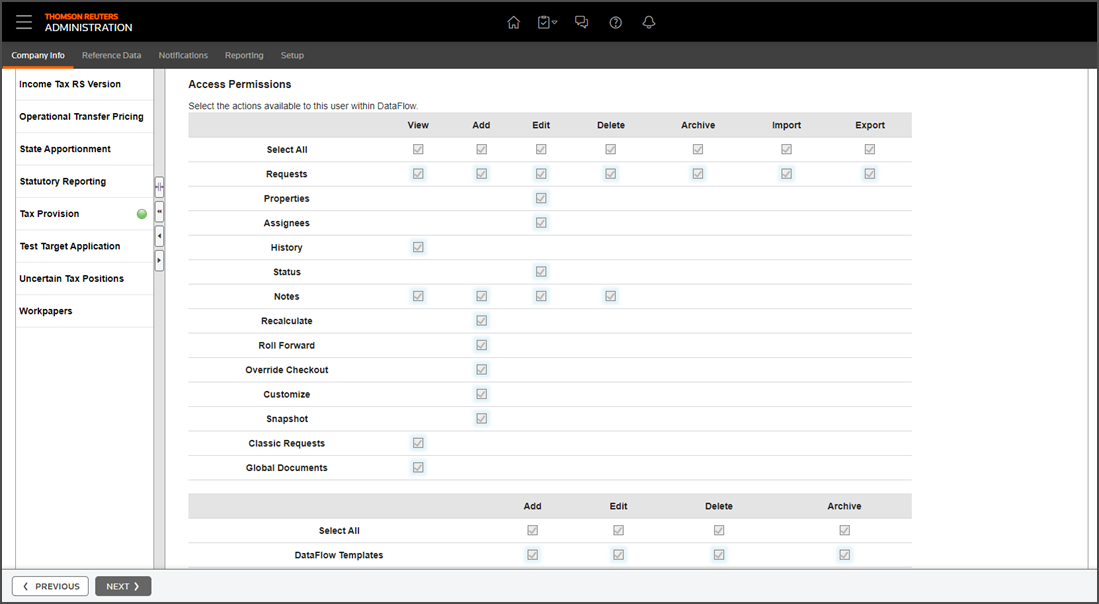
Related Content
-
Administrator types
Format: Article,
3 min read
Article,
3 min read
-
Add or edit groups
Format:
Article,
2 min read
-
Delete groups
Format:
Article,
1 min read
-
Add a user
Format:
Article,
3 min read