
Data functions
ONESOURCE DataFlow provides methods to share data across requests as well as extract data for various reporting and analytics. Working with any DataFlow request requires that the
Request ID
is used to specify the specific requests to work with.The methods
GetList
and GetID
are used to find the specific request IDs. You can use the results from these methods to use the other methods for data retrieval.note
Data retrieval methods shouldn't be nested within any formula.
GetID
Retrieves a single ID of the request that matches the criteria.
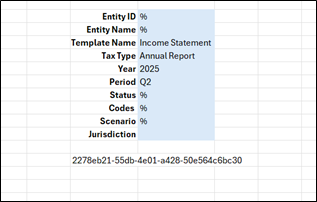
- Entity ID
- Entity Name
- Template Name
- Tax Type
- Year
- Period
- Status
- Codes
- Scenario
- Jurisdiction
All parameters are optional, but provide as many as possible to ensure only 1 request is found.
note
If more than 1 matching request is found, an error that says
Multiple requests satisfy the criteria supplied
is returned. If no request matches the criteria, then No requests satisfy the criteria supplied
will be shown.Extraction | In Request |
|---|---|
EXTDCGetID (Entity ID, Entity Name, Template Name, Tax Type, Year, Period, Status, Codes, Scenario, Jurisdiction, Client Name, Client Number) | DCGetID (Entity ID, Entity Name, Template Name, Tax Type, Year, Period, Status, Codes, Scenario, Jurisdiction, Client Name, Client Number |
GetList
Retrieves a list of requests that match the criteria and places the list in the output range.
Retrieves all requests from 2025 within the Q2 period and have Annual Report as Tax Type.
- Entity ID
- Entity Name
- Template Name
- Tax Type: Annual Report
- Year: 2025
- Period: Q2
- Status
- Codes
- Scenario
- Jurisdiction
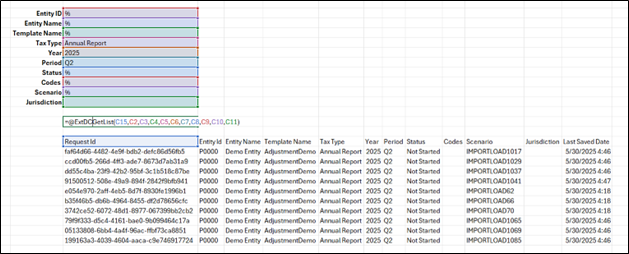
Output Range is required. All others are optional, but provide as many as possible s to keep the resulting list as small as possible.
Extraction | In Request |
|---|---|
EXTDCGetList (Output Range, Entity ID, Entity Name, Template Name, Tax Type, Year, Period, Status, Codes, Scenario, Jurisdiction, Client Name, Client Number ) | DCGetList (Output Range, Entity ID, Entity Name, Template Name, Tax Type, Year, Period, Status, Codes, Scenario, Jurisdiction, Client Name, Client Number ) |
GetData
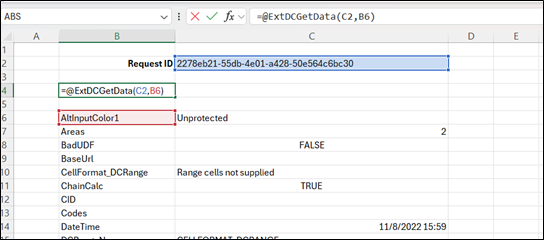
Retrieves all the data for a request except for tabular data. Data is placed at a single value per cell in the output range vertically.
Extraction | In Request |
|---|---|
= EXTDCGetData (Request ID Range, Output Range) | Not available |
GetRange
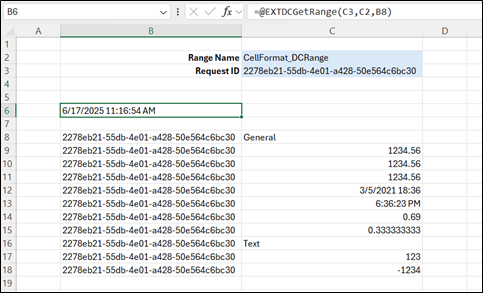
Retrieves the values from a Range for the Request IDs provided and places them in the output location.
Extraction | In Request |
|---|---|
=EXTDCGetRange(Request ID Range, Range Name, Output location) | =DCGetRange(Request ID Range, Range Name, Output location) |
GetValues
Retrieves the values associated with the provided names within the sent request ids. Setting Horizontal Output to
True
will force the transposition of the values to be retrieved.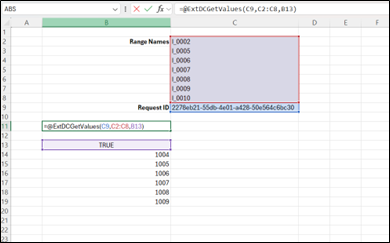
Extraction | In Request |
|---|---|
=EXTDCGetValues(Request ID Range, Range Names, Output location, Horizontal Output) | =DCGetValues(Request ID Range, Range Names, Output location, Horizontal Output) |
GetTable
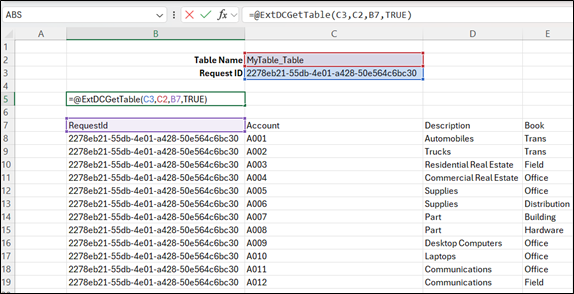
Retrieves the values from a table for the Request IDs provided and places them in the output location, optionally including the headers of the table.
Retrieve all the values from the table MyTable_Table including headers.
Extraction | In Request |
|---|---|
=EXTDCGetTable(Request ID Range, Range Name, Output location, Include Headers) | =DCGetTable(Request ID Range, Range Name, Output location, Include Headers) |
LookUpTable
Retrieves the values from a Table for the Request IDs provided and places them in the output location, based on the criteria, optionally including the headers of the table.
- Columns to Retrieve: The actual header text for a column to retrieve, or a range of cells containing individual column headers.
- Criteria Column: (Optional) The actual header text for the column to check its value.
- Criteria Value: (Optional) the Value to look for.
Extraction | In Request |
|---|---|
=EXTDCLookUpTable(Request ID Range, Table Name, Output location, Include Headers, Columns to retrieve, Criteria Column, Criteria Value) | =DCLookUpTable(Request ID Range, Table Name, Output location, Include Headers, Columns to retrieve, Criteria Column, Criteria Value) |
Examples:
DCLookupTable (RequestID, “MyTable_Table”, $A$15, TRUE, , “Account Number”, “0001”)
Retrieve all the rows from the table MyTable_Table where the Account Number column contains 0001 and place it starting at $A$15.
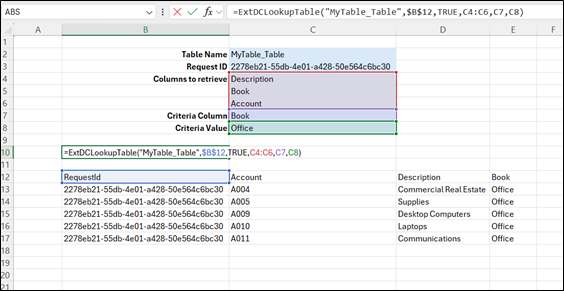
DCLookupTable(RequestID, “MyTable_Table”, $B$12, TRUE, C4:C6, C7, C8)
Retrieve all the values from columns Account, Description and Book, from the table MyTable_Table where the Book column contains Office and place it starting at $B$12.
SetRange
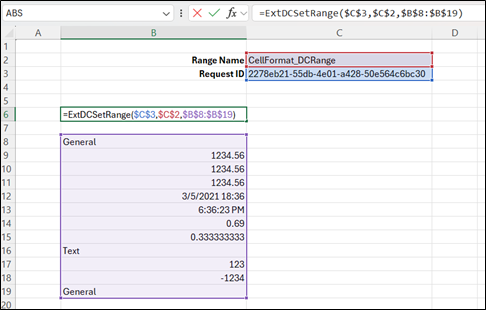
Places data into the requests specified in the Range specified. Setting data with more rows will expand the area of the request. Data is set top left to bottom right within the destination range, additional columns won’t be set and values will be discarded.
Example: Data from $B$8 to $B$19 will be pushed into the Range CellFormat_DCRange.
Extraction | In Request |
|---|---|
=EXTDCSetRange(Request ID Range, Range Name,Value range) | Not available |
SetTable
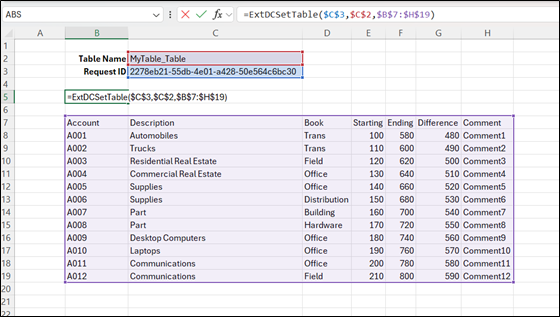
Places data into the specified requests in the specified table. Data is set top to bottom in the destination table, additional columns won’t be set and values will be discarded. Setting data to a table without AddRows enabled will truncate data outside the destination table; AddRows enabled destination Tables will expand to add the data being set. Set needs to include header names.
Example: Data from $B$7 to $H$19 will be pushed into the Table MyTable_Table.
Extraction | In Request |
|---|---|
=EXTDCSetTable(Request ID Range, Table Name,Value range) | Not available |
SetValues
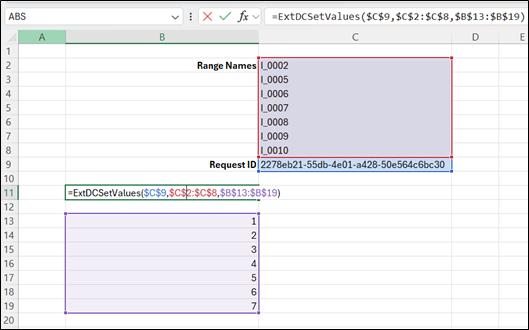
Places data into the requests specified, into the Range Names specified. When setting multiple ranges, the values need to align to the Range Name list.
Example: Data from $B$13 to $B$19 will be set to names I_0002, I_0005, I_0006, I_0007, I_0008, I_0009, I_0010 ($C$2 to $C$8).
Extraction | In Request |
|---|---|
=EXTDCSetValues(Request ID Range, RangeName range,Values Range) | Not available |