
Work with behaviors
DataFlow provides methods that drive behaviors of a request. Behaviors allow the template designer to specify what columns, rows or sheets a data provider will see based on the parameters of the request or data that is available to the request.
HideCol
Extraction | In Request |
|---|---|
No | Yes |
HideCol hides or shows the specified consecutive columns.
- WorksheetName – The name of the worksheet the columns are on.
- Column - the first column number, for instance A is 1, B is 2, and so on.
- Column Hide – True or False, True to Hide.
- Column Count – The number of columns of the first column to hide or show.
For example, from column G (7) to column I (9), will be hidden from the
HideCol
worksheet when opening the Request. 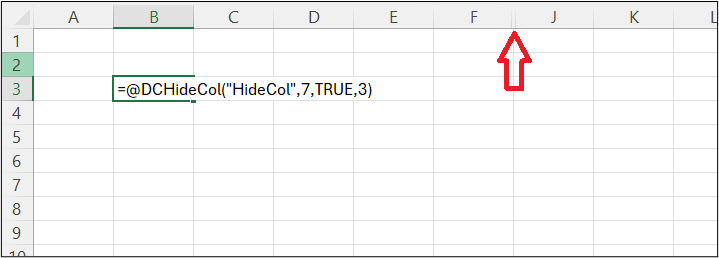
Extraction | In Request |
|---|---|
Not Available | =DCHideCol(WorksheetName, Column, Hide, Column Count) |
HideCols
Extraction | In Request |
|---|---|
No | Yes |
HideCols hides or shows the specified columns.
- WorksheetName – The name of the worksheet the columns are on.
- Hide – True or False, True to Hide.
- Columns – A range containing a numeric list of column numbers, where A would be 1. An example would be 1, 3, 4, 7
For example, columns A (1), C (3), D (4), and G (7) will be hidden from the Worksheet HideCols using the HideCols method.
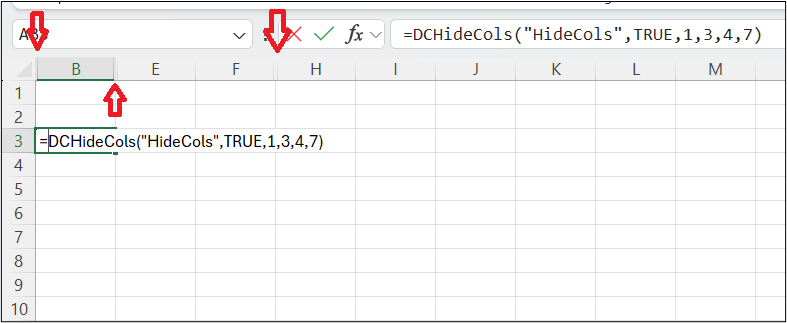
Extraction | In Request |
|---|---|
Not Available | =DCHideCols(WorksheetName, Hide, Columns) |
HideRow
Extraction | In Request |
|---|---|
No | Yes |
HideRow hides or shows the specified consecutive rows.
- WorksheetName – The name of the worksheet the columns are on.
- Row - the first column number, for instance A is 1, B is 2, and so on.
- Hidden – True or False, True to Hide.
- Row Count – The number of columns of the first column to hide or show.
For example, three rows from row 13 to row 15 from the
HideRow
worksheet will be hidden.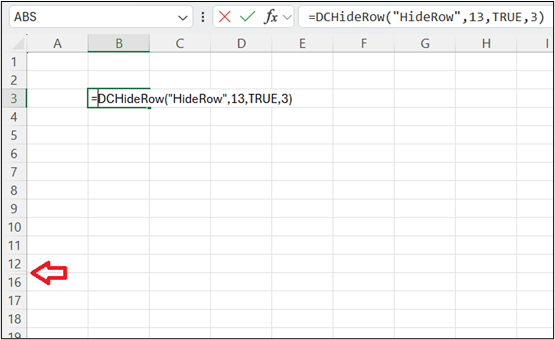
Extraction | In Request |
|---|---|
Not Available | =DCHideCol(WorksheetName, Column, Hide, Column Count) |
HideRows
Extraction | In Request |
|---|---|
No | Yes |
HideRows hides or shows the specified rows.
- WorksheetName – The name of the worksheet the rows are on.
- Hide – True or False, True to Hide.
- Rows – A range containing a list of row numbers. Example: 1, 5, 12
For example, from the
HideRows
worksheet, rows 5, 8, and 13 will be hidden.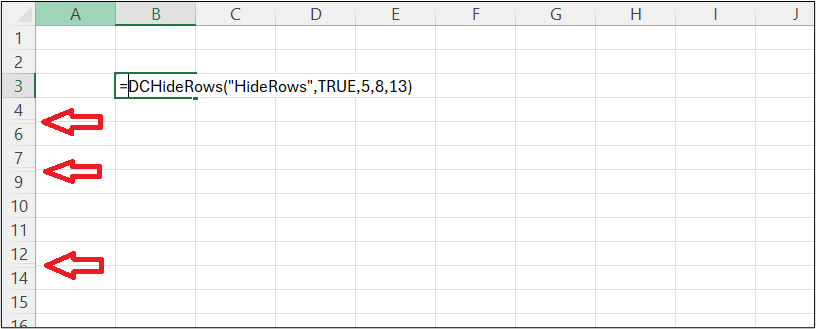
Extraction | In Request |
|---|---|
Not Available | =DCHideRows(WorksheetName, Hide, Rows) |
HideSheet
Extraction | In Request |
|---|---|
No | Yes |
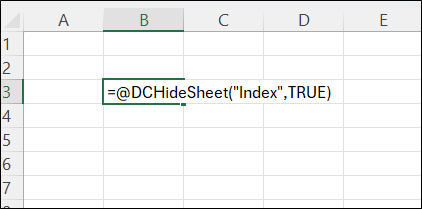
HideSheet hides or shows the specified worksheet.
- WorksheetName – The name of the worksheet to hide.
- Hide – True or False, True to Hide.
For example, using HideSheet will hide or show a specified worksheet.
Extraction | In Request |
|---|---|
Not Available | =DCHideSheet(WorksheetName, Hide) |