
DataFlow integration with General Ledger Manager
The ONESOURCE DataFlow integration with ONESOURCE General Ledger Manager enables you to retrieve data from General Ledger Manager data fields.
This data populates a DataFlow Request using 3 formulas.
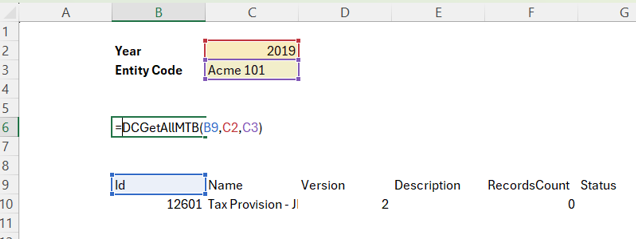
DCGetAllMTB
This formula retrieves a list of all existing Master Trial Balances.
- Usage:=DCGetAllMTB(Output Range, Year, Entity Code)
- Arguments:
- Output Range:Specifies the cell where the data should appear.
- Year:Filters the results by the specified year.
- Entity Code:Filters the results by the entity code associated with the General Ledger Manager Master Trial Balance.
DCGetMTB
This formula retrieves a list of specific Master Trial Balance.
- Usage:=DCGetMTB(Master Trial Balance Id, Output Range, Column, FilterTo, Entity Code)
- Arguments:
- Master Trial Balance Id:A unique identifier for the Master Trial Balance, retrievable using the DCGetAllMTB formula.
- Output Range:Specifies the starting cell for data placement. The data dimensions will match the Master Field data.
- Column (Optional):Filters the data by a specific column name.
- FilterTo (Optional):Specifies the value to filter by within the specified column.
- Entity Code (Optional):Filters the data by a specific Entity.
DCGetMTBSupportFile
This function will retrieve the master trial balance data along with their corresponding account and entity information into a DataFlow request.
- Usage:=DCGetMTBSupportFile (Master Trial Balance Id, Output Range, Client ID)
- Arguments:
- Master Trial Balance Id:A unique identifier for the Master Trial Balance, retrievable using the DCGetAllMTB formula.
- Output Range:The cell where the output data is placed.
- Client Id (Optional):For Client Manager enabled DB, client identifier.
Results

The extraction function for these formulas is available through the Data Collection Add-in, letting you retrieve data from General Ledger Manager using:
- EXTDCGetAllMTB
- EXTDCGetMTB
- EXTDCGetMTBSupportFile