
Create a bookmark
The bookmark feature gives you the ability to bookmark a screen for quick access later.
You can save bookmarks for these areas:
- Data Entry
- Data Review
- Data Source Analysis
- Data Overrides
Steps to create a bookmark
- Open the screen you want to bookmark.
- SelectBookmarksand thenBookmark current view.
- Enter a name for the bookmark, and selectOK.
- After you save a bookmark, selectBookmarksagain.
- From one of the folders, select your bookmark name. That screen will now load with your previous selections and filters.
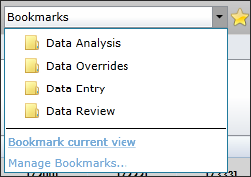
- To manage bookmarks, delete or rename, selectManage Bookmarks.