
Set up data transfers with ONESOURCE Tax Provision
Set up data transfers between ONESOURCE Tax Provision (OTP) and General Ledger Manager (GLM).
Turn on the data transfer in OTP
- Sign in to OTP.
- Select .
- SelectYesinEnable Data Transfer using Datahub / General Ledger Manager.
Extract data from GLM
- Select on the Dataset you want to work with.
- Select your target components on step 1, then selectNext.
- Select your target class, subclass, and units on step 2, then selectNext.
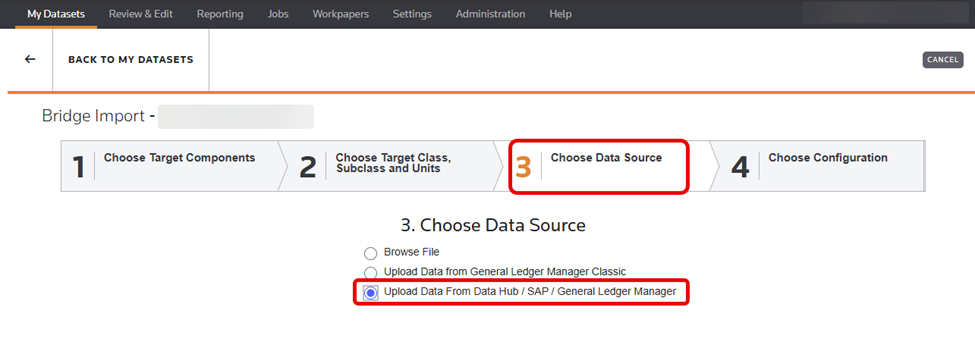
- SelectUpload Data From Data Hub / SAP / General Ledger Manageron step 3, then selectNext.
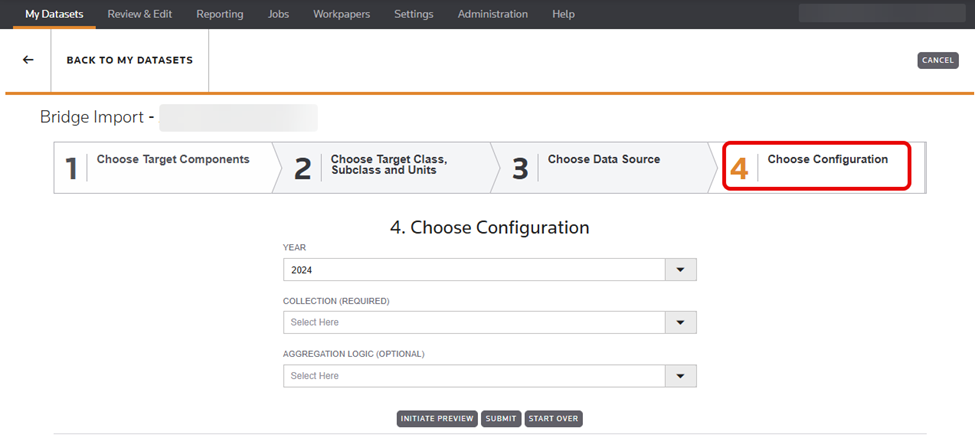
- Select the following on step 4 of the configuration, then selectSubmit:
- Year- usually the same year as the Dataset you selected.
- Collection- this is populated with all published Master Trial Balances (MTB) you have in GLM for the selected year.
- Aggregation logic- this is the same name as the MTB you selected in GLM.
Related Content
-
Integration overview
Format: Article