
Entry Summary: PGA Corrections (CA)
The
PGA Data Corrections
section (CA) allows filers to correct the PGA data transmitted in the Cargo Release transmission. This capability eliminates the need for the importer or broker to delete an entry so the filer can retransmit.All lines from the original entry do not need to be submitted. Instead, the filer only provides the affected CBP entry line, along with all associated HTS codes for that line.
The original entry line and associated HTS code combinations will be compared against the CA submission. If they do not match, the CA will be rejected.
PGA Corrections: Post Arrival and Release
If both the goods and the entry are arrived and released, the CA application is the only method for submitting corrections to PGA data, up to ten (10) days after the entry is released.
For the Food and Drug Administration (FDA), if both the goods and the entry are arrived and released, this transaction can be used only if the FDA status is rejected. FDA also does not allow updates following release.
For other PGAs, the CA can be used after both the goods and entry are arrived and released without a PGA reject status.
PGA Corrections: Pre-Arrival and Release
If the goods have not arrived and the entry has not been released, trade can submit either the cargo release transmission along with PGA data (all rules for the parent transaction apply), or submit the CA only.
For the Food and Drug Administration (FDA), if it is within the five-day screen for arrival, no updates are allowed unless the FDA status is rejected.
If there are no changes to PGA data associated with an entry line for the previous transmission, do not re-submit PGA records associated to that entry line on the CA. The absence of previously-submitted PGA data on a given line tells the system that the previously-submitted PGA data is valid.
To completely replace previously submitted PGA data, provide the new PGA records for the associated entry line. The system assumes that this is the latest data for that PGA, associated with that entry line, and all PGA rules will be run.
note
Currently, the PGA data provided is considered the entire latest snapshot for that agency. In the future, PGA line-by-line manipulation will be allowed. Also, corrections can only be made at the agency (not agency program) level.
PGA Correction Process
The PGA Correction process can only be used when the entry has been released and the PGA Status Notification (SO) messages indicate that the entry has been “ACCEPTED”.
On the Entry Header tab, the
Cargo Release on Summary
field must be set to N
(No Cargo Release) and the Cargo Release Action field must be set to U
(Update Bill and Transport Data).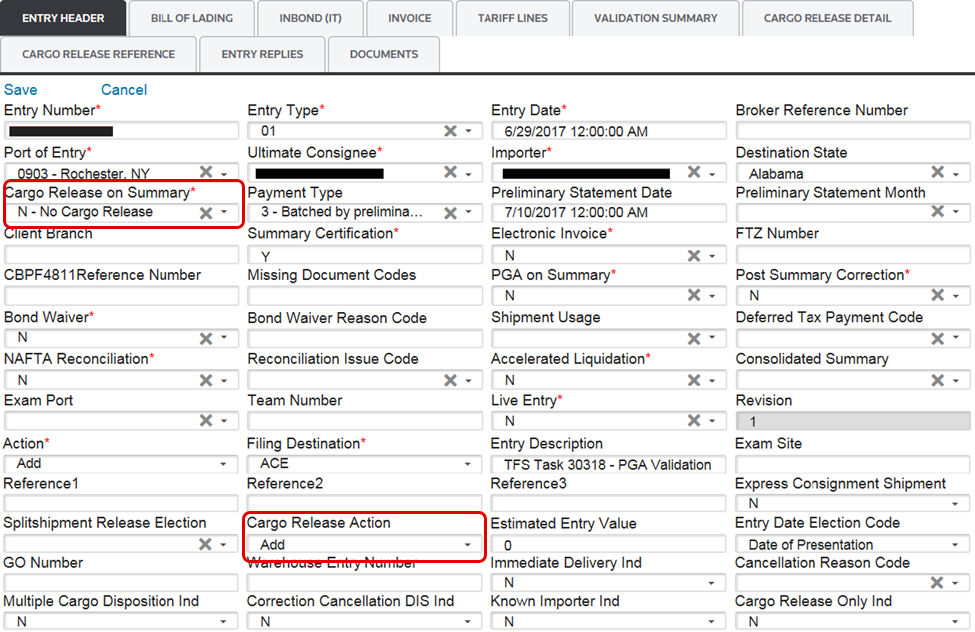
When changes are made to the PGA data on an entry after both the goods and the entry are arrived and released, the system track the updated PGA records and set the
Correction Indicator
field on the PGA screen.Correction Indicator (Field Values) | Description |
|---|---|
R | Indicates a replacement of PGA information. This indicator is triggered by updating any PGA record or by deleting any data element that is not the PGA header. |
A | Indicates an addition of PGA information. This indicator is triggered by adding a new PGA header to the PGA record. |
D | Indicates a deletion of PGA information. This indicator is triggered by deleting a PGA header. To undo a deletion, manually update the Correction Indicator field to R .
note
When a header is deleted, the data will not actually be deleted. You will only see the correction indicator set to D. |
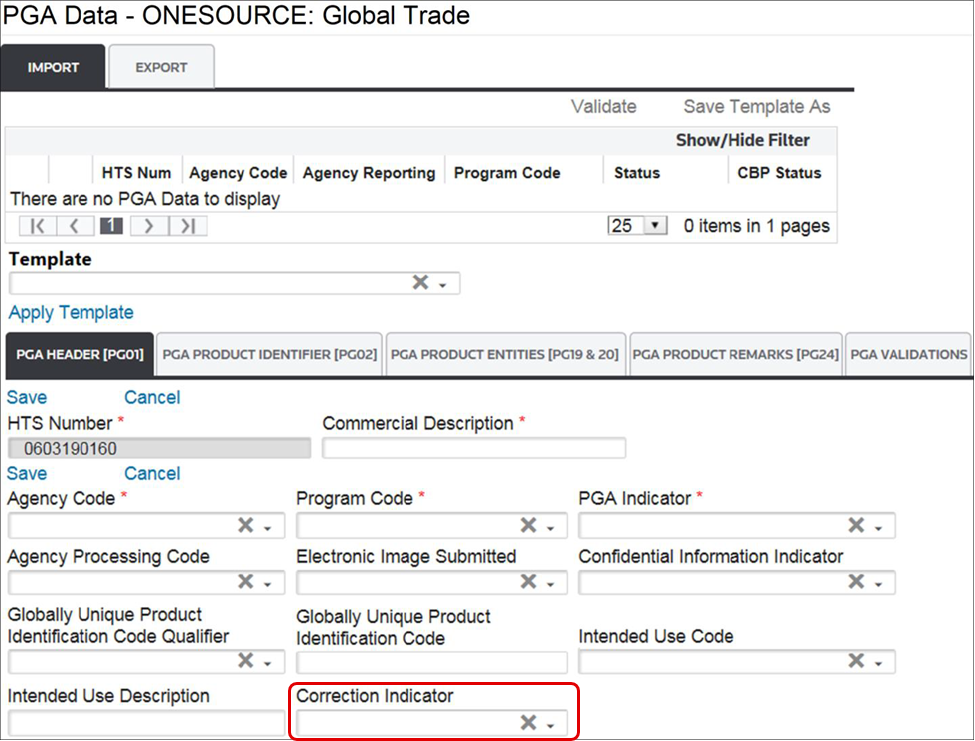
After all changes have been made to the PGA data, you will have to revalidate the PGA data and ensure it is clear of errors. After confirming the data is accurate, click
Transmit PGA Correction
at the top of the screen.
Related Content
-
AMS Query
Format: Article,
1 min read
Article,
1 min read
-
Entry Summary (Entry 7501)
Format:
Article,
1 min read
-
Entry Summary (Entry 7501)
Format:
Article,
1 min read