
Entry Summary: Post Summary Correction (PSC)
A Post Summary Correction (PSC) is an amendment to an Entry Summary (excluding informal entry, type 11 or 12) prior to liquidation; yet after CBP’s acceptance of that Entry Summary, payment has been processed, and the entry is scheduled for liquidation.
The filer has a 270-day screen from acceptance to submit a PSC. The last possible day to submit a PSC is within 20 days of the liquidation date.
CBP views a PSC as a full replacement of the Entry Summary data currently on file and it will be accepted as the most up-to-date data available. However, it is important to remember that After CBP reviews the PSC, CBP may change the associated collection information to reflect any resulting monetary changes.
Most Entry Summary data elements can be updated using a PSC. However, elements affecting admissibility are not allowed to be changed in a PSC.
Just like with conventional summary filings, there are many edits and validations on the CBP side and several types of rejections can be encountered with a PSC filing. If the data is not accepted by ACE, then the Entry Summary data on file in ACE will remain unchanged.
There is no limit to the number of PSC filings ACE will accept for an Entry Summary. However, the filer will be required to provide reasons for the data change on each PSC. It is also important to remember that After a PSC has been accepted by CBP, the filer can no longer submit conventional filings to CBP for that entry.
To identify an entry to be updated using a PSC, open the “Entry Summary” screen. Select an entry and click its corresponding
Detail
link.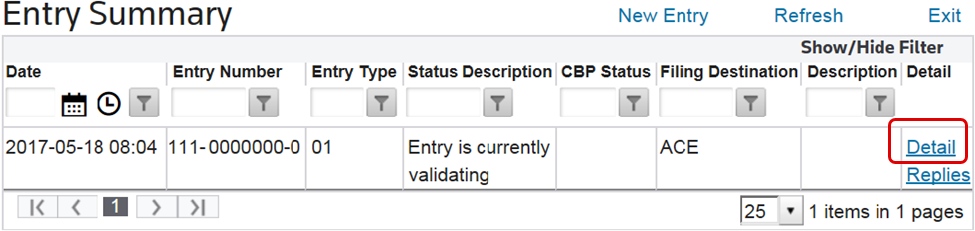
Clicking
Detail
will open the Entry 7501
screen. Open the Entry Header
tab and change the Post Summary Correction
field value to Y
.
Make the necessary changes, then proceed to the
Validate
and Finalize
processes as would be performed for a conventional entry to CBP. These processes are covered in full detail in the Validate
and Finalize
sections listed above in this User Guide.
After the entry has been finalized, review the “
Header Post Summary
” and/or “ Line Post Summary
” tabs. On these tabs, the system will automatically calculate the PSC Reason Codes based on the changes made to the entry.In the event a code is incorrect or missing, these codes can be manually updated without having to Revalidate or Refinalize. Refinalizing will remove any changes made to the Reason Codes.
Changes to header information on the entry will trigger the “
Header Post Summary
” tab to be visible on the entry.The
Explanation
text box is used for providing details on why a change was made to the entry. The Reason Code
box is used for choosing the CBP Reason Code that best explains why the entry is being re-filed with a Post-Summary Correction.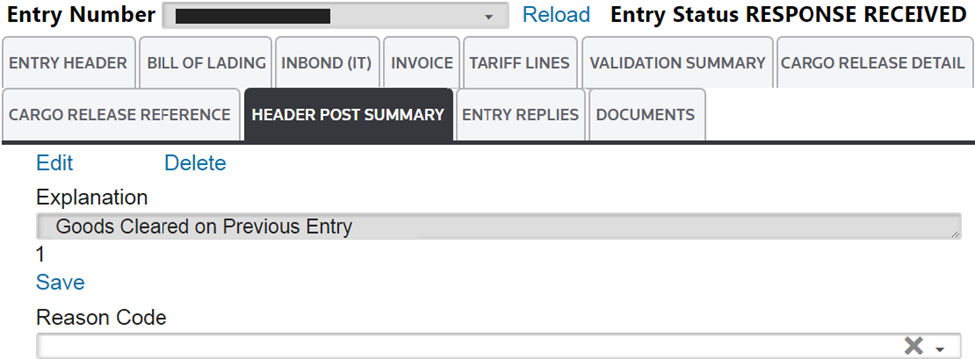
Post Summary Correction Header: Reason Codes | Description |
|---|---|
H01 | The Entry Type Code has been changed specifically from 01 to 03. |
H02 | The Entry Type Code has been changed (other than 01 to 03). |
H04 | The Mode of Transportation (MOT) Code has been changed. |
H05 | The basic and/or additional Surety Company Code has changed. |
H06 | The Continuous Superceded Bond Indicator has changed. |
H07 | Other basic and/or additional bond data has changed. Includes Bond Type Code, Single Transaction Bond Amount, Single Transaction Bond Producer Account Number, Bond Waiver Indicator, and/or Bond Waiver Reason Code |
H08 | The Electronic Invoice Indicator has changed. |
H09 | The Shipment Usage Type Code has changed. |
H10 | The Consignee Number has changed. |
H11 | The Date of Importation has changed. |
H12 | The US State of Destination Code has changed. |
H13 | One or more Entry Summary Header Fee (Header Fee Amount or Accounting Class Code) has changed. Includes 311 (Informal MPF), 500 (Manual Surcharge), and 496 (Mail). |
H99 | Another Entry Summary Header Grouping data element (not listed above) has changed. |
Changes to entry line information will trigger the
Line Post Summary
tab to be visible. In this tab, the filer will provide the CBP Reason Code that best explains the reason for filing the PSC as well as the tariff line number that is being corrected.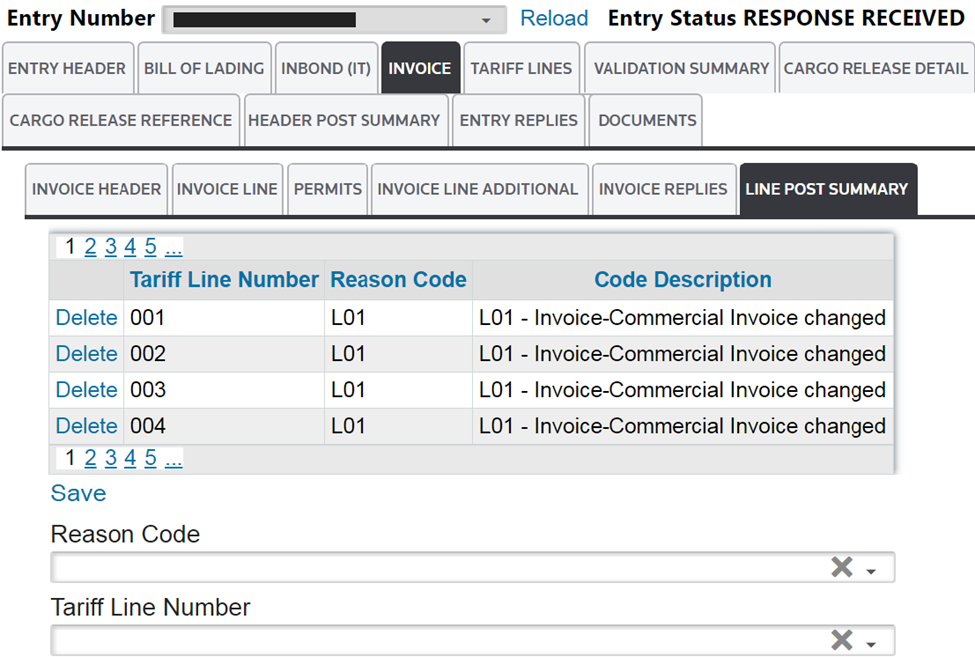
Invoice: Line Post Summary (Reason Codes) | Description |
|---|---|
L01 | The Commercial Invoice has changed or items were missed in the original submission. This change may result in more or fewer Entry Summary Line Item Groupings.
For an EIP summary, the change may affect the EIP Invoice Grouping (i.e., the Invoice Line Reference Detail). |
L02 | The Trade Agreement/Special Program Claim Code has changed, but not the article classification. |
L03 | The classification of an article or an HTS Number has changed. This may affect the Article Set Indicator and/or the Trade Agreement/Special Program Claim Code. |
L04 | The value of the merchandise (Value of Goods Amount) has changed or the basis/determination for the value has changed (e.g. NAFTA Net Cost Indicator). This reason may be used if a currency conversion was a factor resulting in a change to the value. |
L05 | The Charges Amount has changed. |
L06 | The Duty Amount has changed. |
L07 | The Country of Origin Code has changed. |
L08 | The Country of Export Code has changed. |
L09 | The US Department of Commerce has invoked “Critical Circumstances” regarding an Entry Type 01 Entry Summary filed 90 days prior to the Preliminary or Order period for an Antidumping/Countervailing Duty case. |
L10 | One or more Article Party Identifiers (API) has changed, thus changing the Antidumping/Countervailing Duty case suffix. |
L11 | The Case Deposit Rate and/or Case Rate Type Qualifier Code has changed. |
L12 | The scope of the Antidumping/Countervailing Duty case has changed. |
L13 | The Antidumping/Countervailing Duty Non-Reimbursement Statement and/or Antidumping/Countervailing Duty Non- Reimbursement Declaration Identifier changed. |
L14 | The Ruling Type Code or Ruling Number has changed. |
L15 | The 740 Header and/or 740 Continuation has changed (includes a change to an FCC PGA Invoice Description). |
L16 | The IR Tax Information (IR Tax Amount or Accounting Class Code) has changed. |
L17 | The formal Merchandise Processing Fee (499: User Fee Amount or Accounting Class Code) has changed. |
L18 | Another fee has changed (User Fee Amount or Accounting Class Code). Includes a change to 501-HMF or any agriculture commodity fee. |
L19 | The Manufacturer/Supplier Code has changed. |
L20 | The Foreign Exporter Code has changed. |
L21 | The Sold To Party Identifier has changed. |
L22 | The Delivered To Party Identifier has changed. |
L23 | The Category Code (for Textiles) has changed. |
L24 | The Standard Visa Number has changed. |
L25 | The Date of Exportation (for Textiles) has changed. |
L26 | The License/Certificate/Permit Type Code and/or the License/Certificate/Permit Number has changed. |
L27 | The Softwood Lumber Export Price amount has changed. |
L28 | The Softwood Lumber Export Charges amount has changed. |
L29 | Quantity (1,2, or 3) has changed on any HTS Number for the article. |
L30 | The Related Party Indicator has changed. |
L31 | The Gross Shipping Weight has changed. |
Related Content
-
AMS Query
Format: Article,
1 min read
Article,
1 min read
-
Entry Summary (Entry 7501)
Format:
Article,
1 min read
-
Entry Summary (Entry 7501)
Format:
Article,
1 min read