
Linking to Tariff Analyzer Screen from Global Classification
If you have the ONESOURCE Global Trade Global Classification solution, an
Analyze
column exists in the Classification Lookup
screen, provided the site was configured to show this link.Choosing a destination country and clicking the
Analyze
link in this column redirects you to the Tariff Analyzer
screen, pre-populating the destination country and HS code where the HS Number is listed with the product in Global Classifications
.Another way to link the two products is by searching in
Tariff Analyzer
with product number instead of the HS Number. Users subscribed to both Tariff Analyzer and Global Classification with products classified and stored in the system can choose to perform the Tariff Analyzer
search using their company’s product numbers.In the
Tariff Analyzer
screen, you may choose the Select From Global Classification
option. A new pop-up will pop up where the destination country and the user’s product number or product description can be entered into the drop-down boxes.
Clicking
Select from Global Classification
will open a pop-up.
- Click on theSearchdrop-down and decide whether to search by Product Number or by Product Description.

- Begin to enter the Product Number or Product Description. All products matching what was typed will appear in a drop-down below.
- Choose a product.

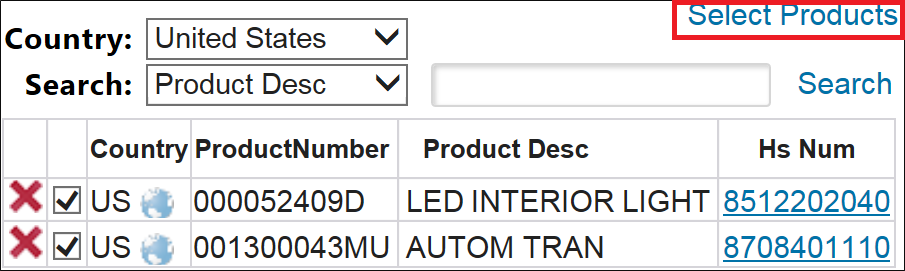
Multiple products can be selected at one time. If a selection needs to be removed, click the adjacent
X
. Clicking the globe icon redirects to the Country Information
detail screen.
Alternatively, you can search by product description.

The system will alert you if the entered description has not been found in their products’ descriptions.

Once the correct product numbers are selected, click
Select Products
.
The destination country/countries will pre-populate according to the associated country of the product number chosen previously. If you have not populated the
Origin Country
field, it will highlight in red and the message on the top of the screen will request for the origin countries to be selected.
After
Search
is clicked in the top right corner, the system performs the standard Tariff Analyzer
search using the HS Numbers previously associated with the partner’s product numbers.The HS Number and Product Number will appear side by side in the
Analysis
grid. If you opted to see the Show HS Description in Result
option, they will see the HS Number description below.
Related Content
-
Global Trade Content (GTC) Analyzer
Format: Article