
Recent Searches
Global Trade Content provides references back to the HS Numbers you viewed in the past thirty (30) days. This is available only to you and cannot be viewed by anyone except the logged in user for the specific partner.
This information can be found by clicking
Recent Searches
in the top right of the Global Tariffs
screen.
The
Search History Detail
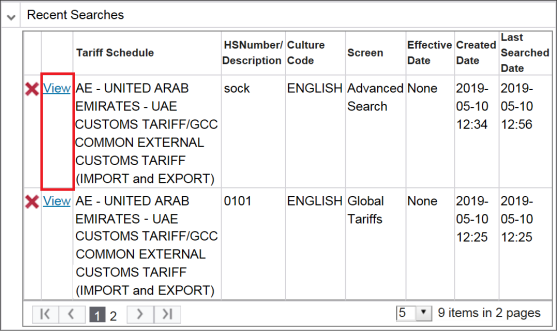
pop-up displays the following information for the past 30 days:Information | Description |
|---|---|
Tariff Schedule | The country and name of the searched tariff schedule. |
HS Number/Description | The HS Number or description searched. |
Culture Code | The language selected for the search. |
Screen | The screen used to perform the search. |
Effective Date | The date the tariff was searched. If a future date was searched, the date will be in the Effective Date column. |
Created Date | The date the search was originally performed. |
Last Searched Date | The most recent date the search was performed. |
Navigating to a Previous Search
To navigate back to the specific HS Number or description searched, choose a search from the grid and click
View
.important
Since data could have changed since the search was performed, the data shown in the search is current: not necessarily what was 1 to 30 days ago.
Removing a Search from Recent History
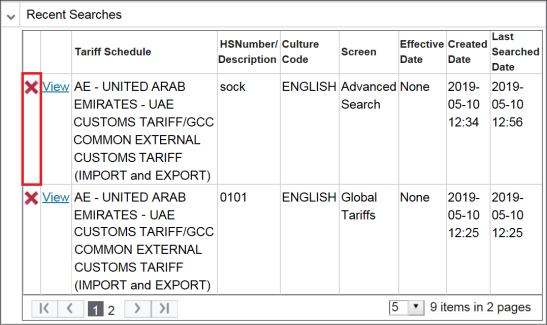
To remove a search from recent search history, choose a search from the grid and click
X
.
A confirmation pop-up will appear on the screen. Click
OK
to delete the search.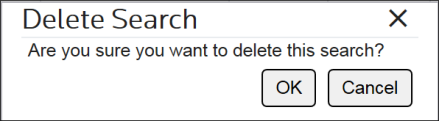
Related Content
-
Global Trade Content (GTC)
Format: Article