
Search Profile
The first time you enter the
Bulletins
screen, the Search Profile
pop-up will appear by default. It can also be brought back up as desired by clicking the Search Profile
link on the screen, as shown below:
Initially, the
Search Profile
pop-up will look similar to the screenshot shown below.
To set up a search profile, choose a country from the
Country
drop-down and then click the Next
button.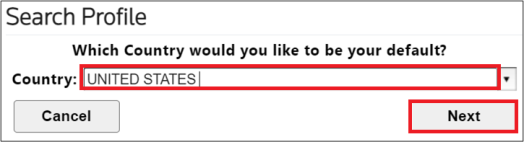
Next, choose a bulletin from the
Bulletin Name
drop-down and then click the Next
button.
Next, choose a year from the
Year
drop-down and then click Save
. At any time, you can also click Cancel
and set up a Search Profile at a later time.
Once a Search Profile is set, the pop-up will close and you will return to the
Bulletins
screen. On future visits to this screen, the profile selected will appear by default in the fields.
Related Content
-
Global Trade Content (GTC)
Format: Article