
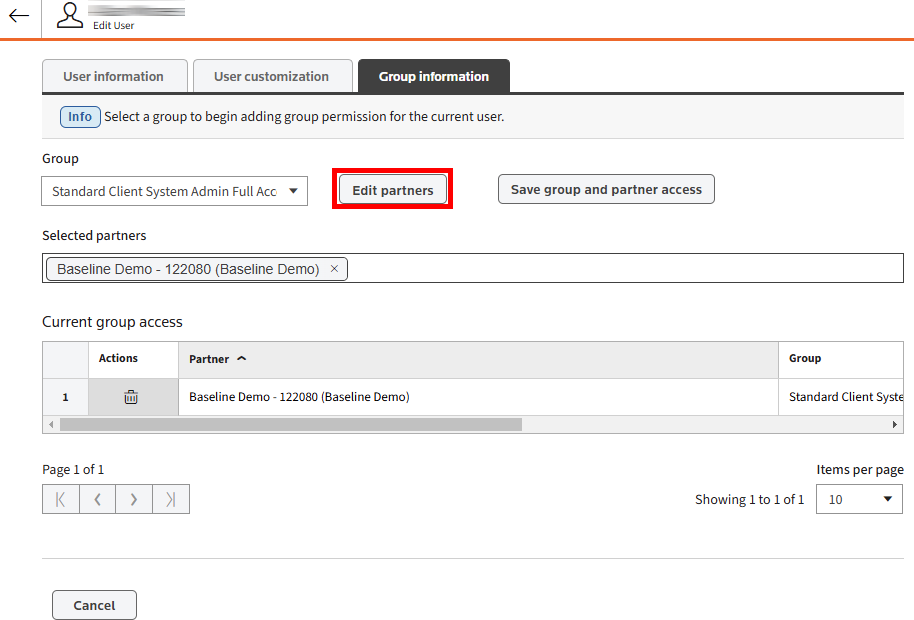
Group information tab
The
Group information
tab shows all partners and group permissions that currently belong to an account, as well as the short name of each partner.To add another group permission: - Select theGroupdropdown list.
- Select the group you want to add permission for.

- SelectEdit partners. Choose a partner from the list of all available partners.
- To access the partners you want, select the checkboxes for their group.
 You can enter a value in theSearch all itemstext box to search for specific partners you want to select.
- After you select all the partners you want, selectSave group and partner accessto save the information.

- A confirmation message will show up on your screen.

- To apply the changes to an account, the person using it must log out, then log back.
- When you open the account, you will now be able to view the newly added partners in the partner drop-down.

Related Content
-
User Access and Setup
Format: Article