
View as... (Different permission group or user)
- Different permission group:To view access for another permission group, go to theSelect group(s) to view asfield and choose a permission group from the drop-down menu. You can view multiple permission groups simultaneously.

- Different user:To view another person’s access to the screen, use the user
 icon and choose a person from the drop-down. This menu supports type-ahead functionality, allowing you to filter results by typing part of a word.
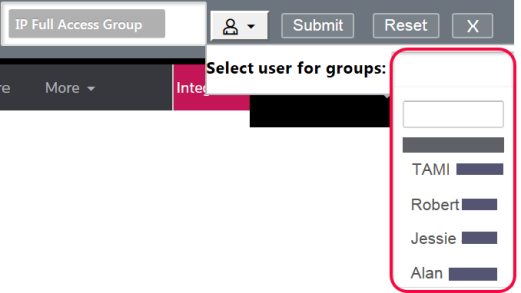 .
.
After selecting the desired permission group(s) or person, use the
Submit
option to refresh the screen and show how it appears.
To revert the screen to its original permissions, select
Reset
. 
To reset the screen and close the  option (“X”) on the far right.This feature allows you to efficiently manage and verify access for different permission groups and people.
View as…
taskbar, use the close option (“X”) on the far right.This feature allows you to efficiently manage and verify access for different permission groups and people. important
User group permissions in ONESOURCE Global Trade are defined during the implementation project. For more information, consult your system administrator or Professional Services.
Related Content
-
User Access and Setup
Format: Article