
DPS Mass Update Company Partner: Batch Status Changes
To perform a mass status update of the entities you have registered in DPS, you can do it through the
DPS Mass Update Company Partner
page. Note that by default this page is not available to all users. If you want to have access to it, please contact support.
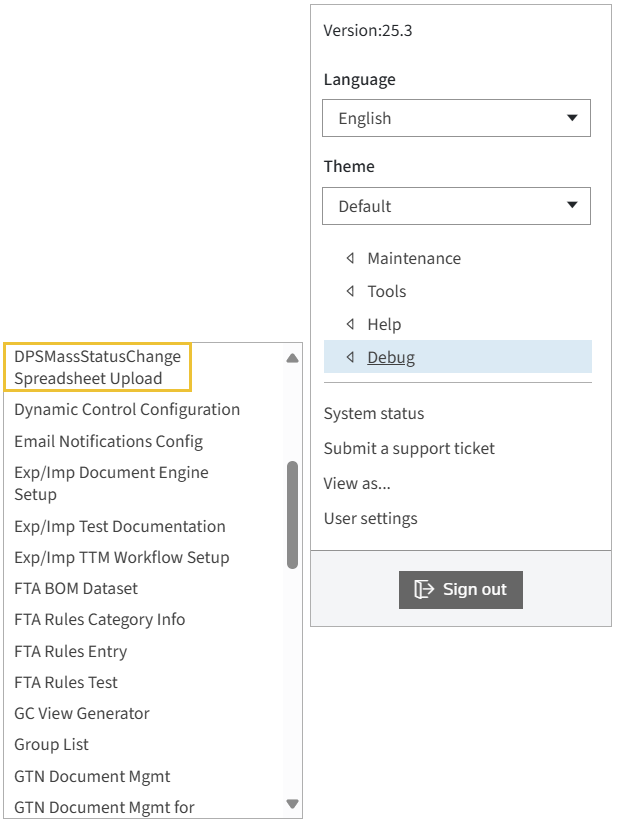
When a spreadsheet is uploaded through this screen, the status of each company in the list will be changed according to table below:
Current Company Status |
Blocked Flag |
New Company Status |
|---|---|---|
Overridden |
Y |
Denied |
Blocked |
Y |
Denied |
Clear |
Y |
Manual Block |
Blocked |
N |
Overridden |
Denied |
N |
Overridden |
Manual Block |
N |
Overridden |
Clear |
N |
Clear |
Denied |
Y |
Denied |
Uploading a Spreasheet
- In theSpreadsheet Uploadsection clickChoose File.
- Choose an Excel spreadsheet from local computer, and then clickUpload and Import Data. Please ensure your spreadsheet matches the system template (a list of company ids withBlockedindicator (Y/N).
- ClickUpload and Import Data.

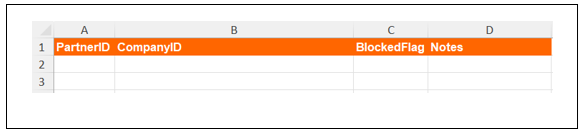
important
Status change only applies to ids included in the template and not to eventual duplicates (records sharing same name and addresses. You have may add a custom note per entry.
Related Content
-
DPS Spreadsheet Import: Mass Uploads for Screening Criteria
Format: Article