
DPS Settings: Advanced Sanction/Embargo Management
Some of the lists of denied entities within ONESOURCE Global Trade Content are comprised of multiple sanctions or embargoes. Some sanctions or embargoes may apply to a company, while others may not.
The
Advanced Sanction/Embargo Management
tab includes a list of all sanctions within the system. Like the organizational lists under the Advanced List Management
tab, you can activate and deactivate sanctions by selecting and clearing the checkboxes on the left.When you perform a screening, companies are only screened against sanctions that are marked as active. You can reactivate deactivated sanctions and embargoes at any time.
Deactivating an Active Sanction/Embargo
To deactivate a sanction or embargo:
- Uncheck the sanction/embargo’s box on the far left
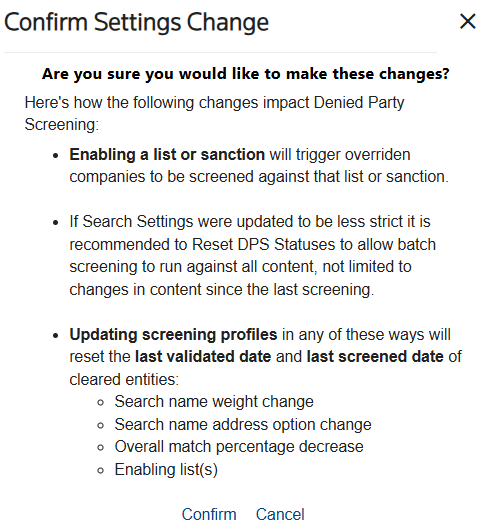
- ClickConfirm Changesto open theConfirm Settings Changepop-up. This confirmation pop-up provides information regarding the automatic system modifications that could potentially occur due to the setting change.
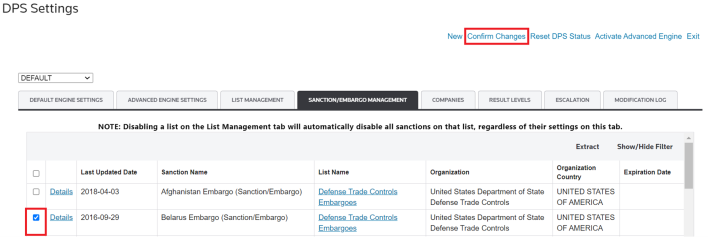
To confirm changes, click
Confirm
.To drop changes, click
Cancel
or X
. 
Changes are applied after you click
Confirm
. A message displays that the search settings were successfully updated.
Reactivating an Inactive Sanction/Embargo
To reactivate a sanction or embargo:
- Click the checkbox for the sanction or embargo on the left.
- ClickConfirm Changes.
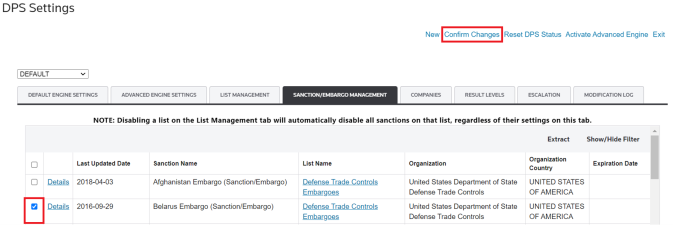
- To confirm your changes, clickConfirm.
- To disregard your changes, clickCancelorX.
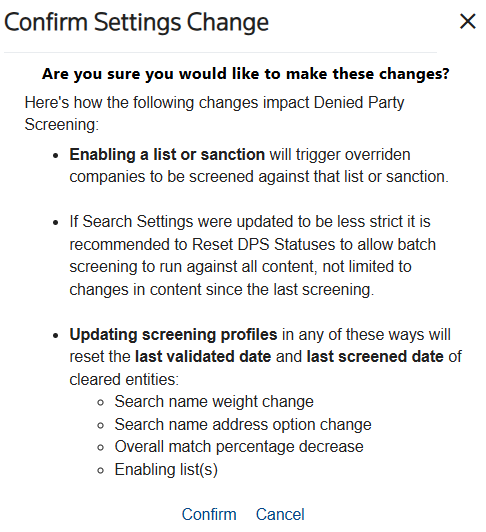
When a previously deactivated sanction/embargo is reactivated, all companies with a status of
Overridden
or Clear
that are a part of nightly batch screenings will be re-screened against the reactivated sanction or embargo. Companies may need to be re-screened before a block can be overridden.Related Content
-
DPS Sanctions Philosophy: Understanding Sanction Target Types
Format: Article