
Validation Group
The
Validation Group
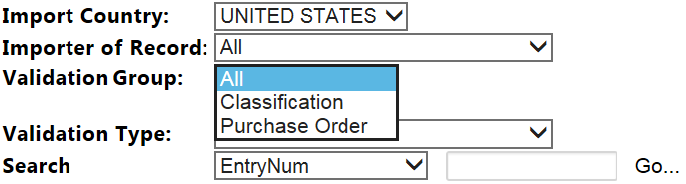
drop-down menu is used for filtering entry data by a "group," which includes related entry validation types. Examples include:- Errors specific to a Purchase Order (e.g., Value, Quantity, etc.)
- Errors specific to Classification (e.g., HS Number, Country of Origin, SPI Code, etc.)
The Validation Group indicates what other data source is being compared to the entry in identifying the validation error.
This drop-down menu is fully configurable to the client’s specifications and (if configured to do so) will display groups such as Classification, Purchase Order, Commercial Invoice, Material Receipt, Accounts Payable, etc.
Validation Groups are dependent on whether the required supporting data (e.g., Purchase Order, Invoice Date) are available as part of the post-entry review process.
The
Validation Group
drop-down menu is an aggregate of the Validation Types configured within the Entry Verification rules engine.With a direct link between the Validation Group and Validation Types, the discrepancies that appear in the selected
Validation Type
drop-down menu will change to show the errors associated with the selected Validation Group.Selecting a Validation Group from the Validation Group drop-down menu will limit the Validation Type errors displayed in the Validation Type drop-down menu to only those errors associated with the Validation Group selected.
Examples of Validation Group Options | Description |
|---|---|
All | Default view displays global view of all entries in the system. |
Purchase Order | Includes Validation Type errors caused by discrepancies between entry data and purchase order data stored in the system. Examples include:
|
Receipt File | Includes Validation Type errors that are caused by discrepancies between entry data and receipt data stored in the system. Examples include:
|
At this time, you have the option of directly selecting an entry or using the filters to view specific Validation Group discrepancies.
Related Content
-
Entry Validation
Format: Article